
Raise Barbershop Prices in 2–4 Weeks: 6 Step Plan for Owners
Raise Barbershop Prices in 2–4 Weeks: 6 Step Plan for Owners
Raise your prices by running a quick cost-based calculation, picking a defensible percentage, and setting a change date two to four weeks out. Update your booking system and website before that date, then announce the new rates clearly. A platform with provider-level pricing controls and payment tools can make the rollout faster and cleaner.
TL;DR:
- A typical price increase should be around 5 to 10 percent annually, with larger catch-up hikes of 15 to 20 percent every few years if needed.
- Updating prices involves first changing service costs, then packages and vouchers, and finally website content, while monitoring for provider-specific overrides.
- Notifying clients 2 to 4 weeks in advance through all channels with clear, factual messaging helps minimize pushback and maintains trust.
- Monitoring booking volume, revenue per client, and cancellation rates during the first month after a price change determines if additional adjustments are necessary.
- Platforms with provider-level controls and automated updates can streamline the rollout, ensuring consistent prices across booking systems, websites, and payment processing.
Table of Contents
- Quick Action Checklist for a Barber Price Increase
- How Do You Calculate a Fair Price Increase?
- When Should You Raise Prices, and By How Much?
- How Do You Update Prices in Your Booking System?
- How Do You Tell Clients About a Price Increase?
- What Should You Track After Raising Prices?
- How Does a Branded Platform Handle Price Changes?
- An Owner’s Take on Raising Prices
- Ready to Simplify Your Next Price Update?
- Sources
Quick Action Checklist for a Barber Price Increase
Here’s the order that actually works, start to finish:
- Calculate your number (30 to 60 minutes): run the cost-based math below to find your required average price.
- Pick a percentage and a date (same day): choose the increase and set it 2 to 4 weeks out.
- Update your booking system (1 to 2 hours): change service prices, then packages and vouchers.
- Publish the notice (1 day): in-shop signage, email, text, and social all go out together.
- Brief your staff (15 minutes): every chair should give the same answer if a client asks why.
- Monitor bookings (ongoing): check volume and no-show rates for the first two to four weeks.
How Do You Calculate a Fair Price Increase?
Start with your actual costs, not a gut feeling. Add up rent or chair rent, supplies, insurance, software subscriptions, taxes, and wages (including your own). Divide that monthly total, plus the take-home you want, by your expected monthly client count. That gives you the average price you need to charge per visit.
The formula looks like this:
- (Desired monthly take-home + total monthly costs) ÷ expected monthly clients = required average price
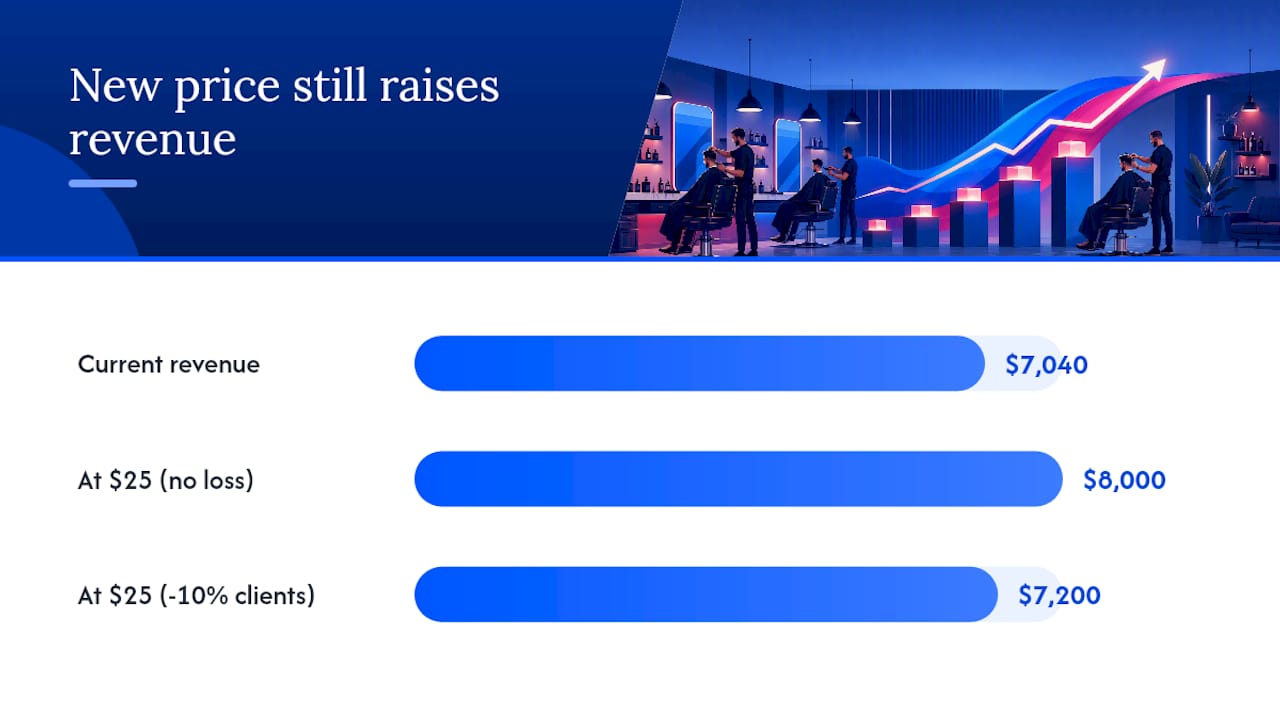
Say your costs run $4,200 a month and you want $3,800 in take-home pay, with 320 client visits expected. That’s $8,000 divided by 320, or $25 per visit average. If you’re currently charging $22, you need roughly a 14% increase to hit the number, comfortably inside the 5 to 10% annual, 15 to 20% catch-up range most industry data supports.
Pro Tip: Build a simple spreadsheet that models a 10% client drop at the new price. If your revenue still beats today’s numbers after losing one in ten clients, the increase is safe to launch. A price increase calculator that compares current price against proposed price and monthly client count does this same math automatically, and it’s worth setting up once so you can reuse it every review cycle.
When Should You Raise Prices, and By How Much?
Review pricing once a year as a baseline, and adjust midyear only if costs jump suddenly, like a rent hike or a supply cost spike.
- Annual increases: 5 to 10% keeps pace with rising costs without shocking regulars.
- Catch-up increases: 15 to 20% is reasonable if you haven’t touched prices in three or more years.
- Round sensibly: $32 beats $31.50 on a menu board. Round up, never down, and keep it consistent across services.
- Keep the menu simple: 4 to 6 core services with clear senior or add-on pricing reads better than a wall of grades and exceptions.
- Pair it with something visible: a new chair, faster booking, or a skill upgrade gives clients a reason beyond “costs went up.”
Small, steady increases are easier to swallow than one big jump every five years, both for your clients and for your own bookkeeping.
How Do You Update Prices in Your Booking System?
Change prices in this order, and don’t skip steps: service prices first, packages and vouchers second, website content last. Support documentation across scheduling platforms confirms this sequence matters because packages and vouchers often reference the old service price internally.
- Bulk update tools let you apply a flat percentage or fixed dollar amount across multiple services at once, with rounding shortcuts and location scoping if you run more than one shop.
- Existing appointments usually don’t auto-update. A client who booked three weeks ago at the old price typically keeps that price unless you manually edit the appointment.
- Watch for provider-level overrides. If a barber has a custom price set on their own profile, a global price change won’t touch it until that override is removed.
- Check your website separately. Published service pages, pricing widgets, and any custom text blocks need a manual sweep so the public price matches the booking price.
For multi-location shops, run the update location by location and confirm each provider’s profile reflects the new number before you publish anything.
How Do You Tell Clients About a Price Increase?
Give clients 2 to 4 weeks’ notice, and use every channel at once: an in-shop sign, a booking confirmation email, a text blast, and a short social post. Consistency across channels matters more than clever wording, since clear communication tied to a real reason is what actually reduces pushback.
Keep the tone factual and forward-looking, not apologetic. Two templates that work:
- Public announcement: “Starting [date], our prices are adjusting to reflect rising costs and continued investment in [new equipment/training/service]. Thanks for trusting us with your look.”
- Loyal client message: “You’ve been coming to us for a while, so we wanted you to hear it directly: prices go up on [date]. Book before then to lock in the current rate.”
If someone has a prepaid package, honor the price they paid for the visits already purchased. That single decision resolves most refund questions before they’re even asked. Running a short “book now before the change” window also lets clients lock in old pricing on packages, which smooths your revenue instead of creating a cliff on the change date.
What Should You Track After Raising Prices?
Watch these numbers for the first month:
- Booking volume compared to the same period last year.
- Chair utilization rate for each barber.
- Average revenue per client visit.
- New client inquiries, since a price increase sometimes shifts your positioning.
- No-show and cancellation rates, which can spike briefly after a change.
If volume stays down more than 15% after a month, review whether the increase outpaced local demand, and consider a staggered second phase or a targeted win-back offer for regulars who haven’t rebooked.
How Does a Branded Platform Handle Price Changes?
Provider-level pricing controls matter here: each barber can set their own rate without waiting on an admin to touch every profile individually. A platform with bulk price updates, published website sync, and payment integration can ensure the price a client sees on your site matches what they’re charged at checkout.
- Update a service price once, and it can push to your booking system, website, and mobile app together instead of three separate edits.
- Provider pricing controls let each barber adjust their own rates without breaking shared packages.
- Built-in payment integration means the new price is what actually processes, with no mismatch between quote and charge.
Pro Tip: Use automated booking confirmation emails to double as your price-change notice. Clients see the new rate the moment they book, which cuts down on “wait, how much?” conversations at the chair.
An Owner’s Take on Raising Prices
Small, regular increases are far less stressful than the big catch-up jump, both for the client relationship and for your own nerves on the day you flip the switch. Most clients expect prices to move over time. What actually irritates people is silence followed by a surprise. Tie the increase to something they can see, a better product line, faster booking, a cleaner shop, and the conversation mostly takes care of itself. Tools that handle the pricing updates and notifications for you free up the mental space to focus on the chair, not the spreadsheet.
— Service
Ready to Simplify Your Next Price Update?
A branded website, booking system, and mobile app that update together can simplify price changes without editing multiple places by hand. Provider-level pricing allows each barber to set their own rates, bulk tools handle shop-wide adjustments, and integrated payment processing keeps prices consistent throughout.

If you’re weighing your options, see how the platform stacks up in the Exclusively vs. SQUIRE comparison or check provider-level booking features built for exactly this kind of rollout. For announcement copy and pricing-page wording, a resource like HarbourSide Digital’s pricing guides can help you sharpen the message. When you’re ready to see it running in your own shop, book a call or view current plans to get your next price change live in days, not weeks.
Sources
- How Barbers Should Set and Raise Their Prices
- How to make a price change
- Bulk Price Update | Client Diary Knowledgebase
- Barbershop Pricing Strategy: How to Set Service Prices That Reflect Value and Support Profit