
10 Step Checklist to Add Booking Add Ons for Salon Managers
10 Step Checklist to Add Booking Add Ons for Salon Managers
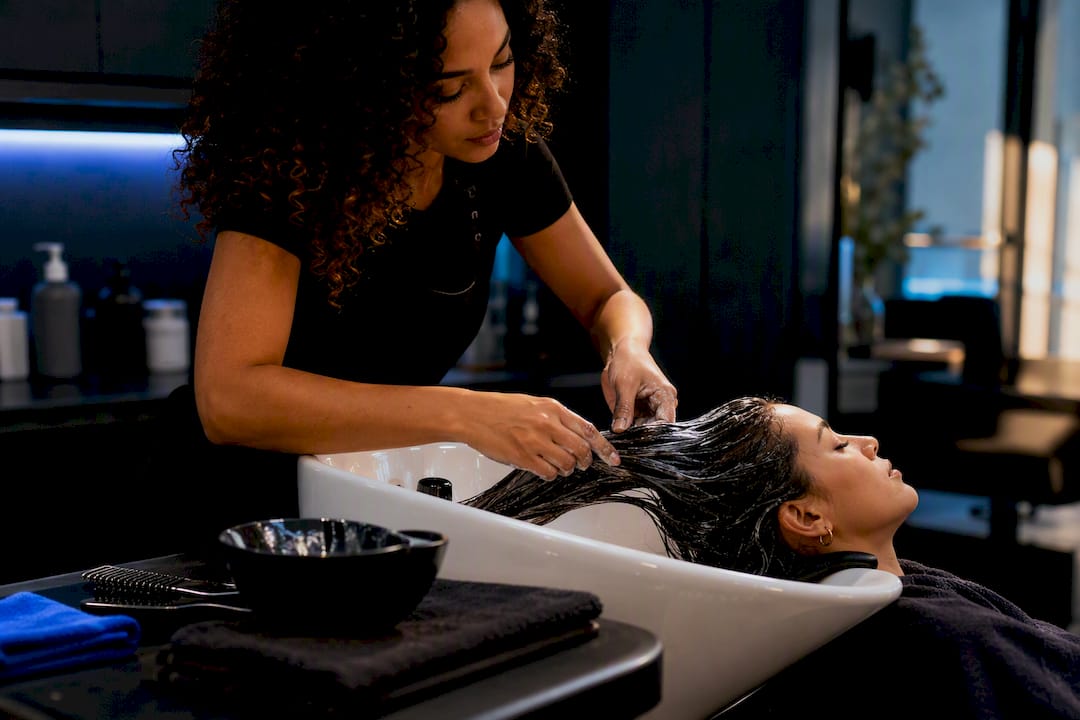
Booking add-ons are optional service upgrades a client selects during scheduling, like a gloss treatment tacked onto a color service or a scalp massage added to a haircut. Salons that price and present add-ons well typically see a real lift in average ticket value, plus better client outcomes since the extra step often addresses a need the base service doesn’t. The trade-off: add-ons extend appointment length, so they only work when your scheduling software handles duration, pricing, and staff assignment correctly.
TL;DR:
- Offering relevant add-ons during booking increases average sales quickly by monetizing existing appointments, especially when embedded naturally into service menus.
- Attach add-ons to specific primary services using scheduling tools that adjust appointment duration and price automatically, preventing double-bookings and scheduling errors.
- Present add-ons immediately after the client chooses a core service, using simple checkboxes and benefit-focused pricing shown in real time to boost conversion.
- Limit new add-ons to a maximum of three when launching, test different pricing and placement strategies, and track staff performance to optimize uptake and revenue.
- Use branded, platform-specific booking systems that give stylists control over pricing and timing, with integrated payments via Square or Stripe, to streamline setup and operational consistency.
Table of Contents
- What Are Booking Add-Ons and Why Do Salons Use Them?
- Common Add-On Types and Where They Fit on Your Menu
- How Add-Ons Work Inside a Salon Booking System
- Best Practices for Presenting and Pricing Add-Ons
- Scheduling, Staffing, and Policy Trade-Offs
- Step-by-Step Checklist to Add Booking Add-Ons to Your Scheduler
- How a Branded Platform Handles Add-Ons in Practice
- Set Up Add-Ons on a Platform Built for Your Brand
- Sources
- FAQ
What Are Booking Add-Ons and Why Do Salons Use Them?
An add-on is a supplemental service a client attaches to a primary appointment, priced and timed separately but booked in the same visit. Think of a deep conditioning treatment added to a blowout, or a brow tint added to a lash lift. The client gets a better result. You get a bigger ticket.
The business case is straightforward. Salons that build a habit of offering relevant add-ons increase average order value without adding a single new client to the calendar. You’re monetizing the appointments you already have. Done right, add-ons also improve client lifetime value: someone who tries a scalp treatment and likes it often books it standalone or upgrades her regular package next visit.
Add-ons differ from standalone services in one important way: they’re rarely marketed on their own. A gloss treatment sold as an add-on gets framed as an enhancement to the color service the client already wants, not a separate purchase decision. That framing matters. Asking someone to spend an extra $8 to “finish” a service she’s already committed to is a much easier yes than asking her to book a whole new appointment for the same treatment.
Real salon menus make this pattern obvious. Salon@Church lists deep conditioning, glosses, toners, and scalp treatments as add-ons attached to core services, explicitly noting they extend appointment duration and should get booked in advance. Lewa Salon frames its add-ons as enhancements recommended based on hair condition, not generic upsells everyone gets pitched.
A few reasons this model works better than treating every service as a standalone line item:
- Add-ons reduce the friction of trying a new service, since the client is already in the chair and already committed.
- They let stylists recommend based on what they actually see, which builds trust instead of feeling like a sales script.
- They smooth revenue without requiring more appointment slots, which matters most during slower weeks.
- They create a natural upgrade path, turning one-time add-on buyers into repeat package clients.
Common Add-On Types and Where They Fit on Your Menu
Most salons organize add-ons around the services they’re likely to accompany. That pairing logic is worth building into your own menu, because a scalp treatment attached to a color appointment sells very differently than one attached to a blowout.
Hair treatments and conditioning. Deep conditioning, protein treatments, and bond repair are common add-ons because they pair with nearly anything, cuts, color, blowouts. Salons commonly price starter versions at affordable rates, adding additional time to the appointment.
Color enhancers. Glosses, toners, and a supplemental color bowl are natural pairings for color services specifically. Salon Eunoia lists transparent starting prices for these add-ons, typically at moderate price points, with additional appointment time added depending on hair length.
Finishing services. Blowout upgrades, flat iron finishing, and texture treatments pair well with cuts and color when a client wants a special-occasion result. These tend to run shorter with a modest increase in appointment time and price.
Brows and lashes. Brow tints, lash tints, and quick lash lifts pair naturally with facial or color appointments where the client is already in the chair for an extended visit. These add-ons usually increase appointment time moderately for a reasonable additional price.
Scalp treatments. Scalp massages, exfoliation, and cooling treatments pair with almost any hair service and are popular add-ons because clients notice the relaxation value immediately. These generally add a short duration and reasonable extra cost.
Mini upgrades. Smaller extras, such as an extra color bowl, a hairline touch-up, or a quick gloss refresh, round out the list. They typically add a few minutes and a modest additional charge, making them easy impulse adds near the end of a booking flow.
None of these numbers are fixed rates. Pavía Salon shows starting prices that vary by market and by the skill level of the technician performing the add-on. The exercise worth doing is mapping your own service menu against these six categories and testing where a $15 to $30 add-on makes sense for the services you already book most.
How Add-Ons Work Inside a Salon Booking System
Getting add-ons to actually show up correctly during booking, rather than confusing clients or breaking your calendar, comes down to four mechanical pieces: attachment rules, pricing and duration fields, the visual pattern clients see, and how payment gets handled.
1. Attach add-ons to specific services, not the whole menu. A gloss treatment should appear as an option when a client books a color service. It shouldn’t appear when someone books a men’s haircut. Most scheduling systems let you tag an add-on to one or several parent services, which keeps the booking flow relevant and prevents the “why is this even an option” confusion that kills conversion.
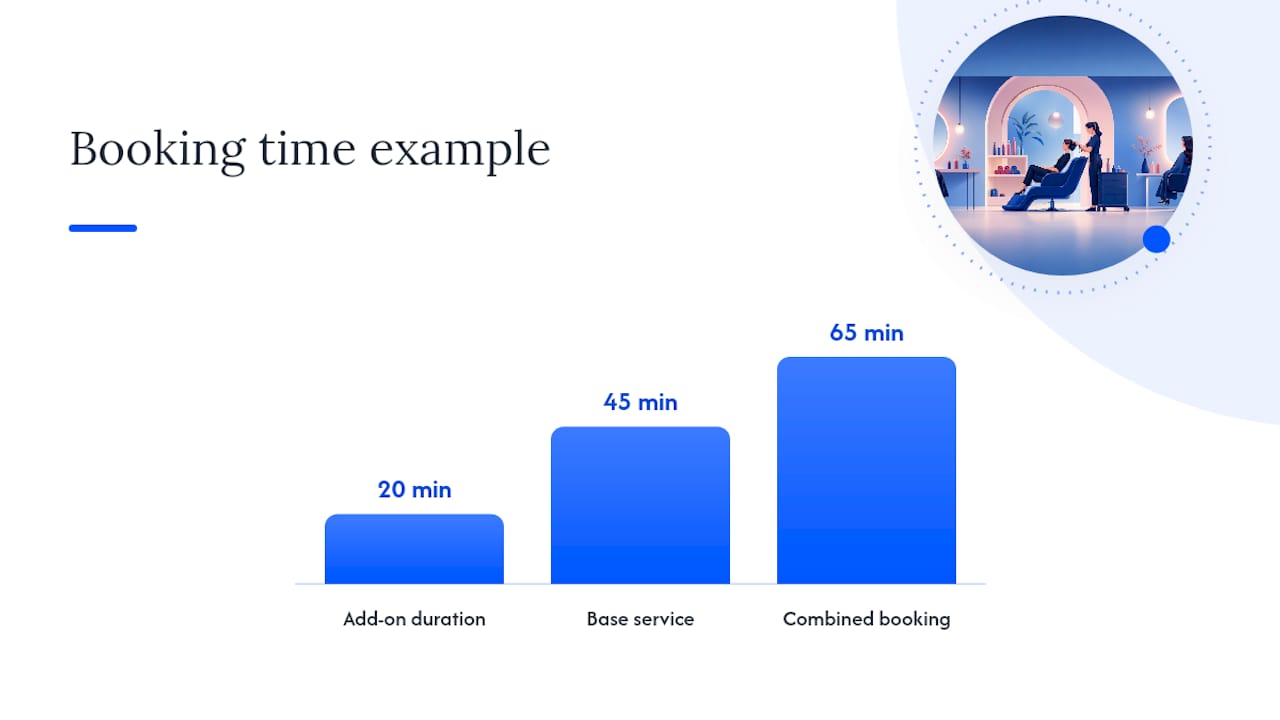
2. Set price and duration per add-on, and let the calendar adjust automatically. Every add-on needs its own price and its own duration value. When a client selects a 20-minute deep conditioning treatment on top of a 45-minute blowout, the system should book a 65-minute slot automatically, not force your front desk to manually pad the calendar. This single feature is the difference between add-ons that boost revenue and add-ons that quietly cause double-bookings.
3. Expect one of three common visual patterns. Booking flows typically present add-ons after the client picks a primary service, using checkboxes for simple yes/no extras, quantity selectors for things like extra color bowls, or small thumbnail images that show what the treatment looks like. The running total updates live as the client checks boxes, which matters more than it sounds. Seeing the price tick up in real time, rather than getting surprised at confirmation, keeps trust intact.
4. Decide when and how you charge. You have three real options:
- Charge the full add-on price at the moment of booking, alongside any deposit for the main service.
- Charge nothing at booking and settle the full ticket, base service plus add-ons, at checkout.
- Take a partial deposit at booking (common for higher-value add-ons) and collect the balance at the appointment, with the card on file to cover no-shows.
Most salons land on option two for simple add-ons under $30 and option three for anything requiring specialty product or extended chair time. Card-on-file matters more here than for a standalone booking, because an add-on that gets canceled last minute wastes prepped product and a longer time block than the base service alone would have used.
Pro Tip: Surface the added minutes, not just the added dollars, during checkout. A client who sees “+15 minutes” alongside “+$22” is far less likely to no-show or run late, because she’s mentally budgeted the extra time, not just the extra charge.
Best Practices for Presenting and Pricing Add-Ons
Where and how you show an add-on changes uptake more than the add-on itself does. A $25 gloss treatment pitched at the wrong moment gets ignored. The same treatment, offered right after the client picks her color service, gets booked.
Pricing that doesn’t trigger hesitation. Round numbers ($20, $35) read as simpler decisions than precise ones ($22.50). Frame the price around the benefit, not the time, “smoother, shinier hair for six weeks” sells better than “20-minute treatment.” Avoid pricing add-ons so high they compete psychologically with the base service. If your blowout is $45, a $40 add-on feels like a second full service, not an extra.
Placement matters more than most managers assume. The strongest moment to offer an add-on is immediately after the client selects her primary service, before she reaches payment. This mirrors the classic fast-food upsell pattern for a reason: the decision is small, the client hasn’t mentally closed the transaction yet, and she’s already thinking about the appointment. Waiting until confirmation or the front desk loses momentum. Waiting until she’s already in the chair works too, but only if your booking system flagged the recommendation for the stylist ahead of time.
Bundle strategically, don’t bundle everything. Pairing a scalp treatment with a color service as a discounted bundle (say, $10 off when booked together) can lift uptake, but only when the bundle feels like a genuine value, not a way to disguise a price increase. Test one bundle at a time rather than bundling your entire menu at launch.
Give staff a script, not a sales pitch. The best-performing salons train stylists to recommend add-ons based on what they observe, not a rehearsed line. A simple prompt works: “Your ends are looking a little dry, want me to add a quick bond treatment today? It’s $18 and adds about 10 minutes.” Specific, tied to something the client can verify, and framed as a question rather than an assumption.
A short testing checklist for the next 90 days:
- Test two price points on your highest-volume add-on and track which converts better.
- Test add-on placement: booking-flow prompt versus front-desk prompt versus in-chair recommendation.
- Track uptake rate by staff member, some will need more coaching on the script than others.
- Review which add-ons get repeat bookings versus one-time trials, and promote the repeat performers harder.
Pro Tip: Don’t launch more than three add-ons at once. Salons that roll out a long add-on menu on day one usually see confused clients and inconsistent staff pitching. Start with your best-fit pairing, nail the script and the price, then expand.
If your add-on strategy extends to local marketing, pairing it with dedicated salon SEO support can help new clients discover your enhanced service menu before they ever call to book.
Scheduling, Staffing, and Policy Trade-Offs
Every add-on you sell eats into the same finite resource: chair-minutes.
The simplest way to model this is converting average add-on duration into weekly chair-minutes. If ten clients a week add a 15-minute treatment, that’s 150 extra chair-minutes, roughly two and a half extra appointment slots’ worth of time, that needs to come from somewhere: either padded buffers, a slightly later close, or fewer walk-in slots.
A few operational rules worth setting before you push add-ons hard:
- Restrict certain add-ons to trained staff only. A bond-repair treatment or a chemical-based gloss shouldn’t be assignable to a technician who hasn’t been trained on it, which is why setting staff-level permissions per add-on protects quality and reduces redo appointments.
- Build in turnaround buffers, not just service time. Add-ons that use product (masks, toners) often need a few minutes of processing or cleanup that isn’t part of the “service” time itself. Pad the calendar accordingly or you’ll run into cascading lateness by 2 p.m.
- Tie deposits to add-on value, not just base-service value. If a client books a color service plus a $40 add-on, your no-show policy should account for the full ticket, not just the base service, since a cancellation wastes both time blocks.
- Set clear cancellation windows for add-on-heavy bookings. Because these appointments run longer, a same-day cancellation costs you more lost chair time than a standard visit would.
The goal isn’t to discourage add-on sales. It’s to make sure your calendar reflects the real time cost before you start promoting them at the front desk.
Step-by-Step Checklist to Add Booking Add-Ons to Your Scheduler
Rolling out add-ons correctly takes less than a week if you work through it in order. Skipping steps, especially the end-to-end test, is where most salons run into double-bookings during their first month.
- Pick your first three add-ons. Choose based on what pairs naturally with your highest-volume service. Don’t start with your whole wish list.
- Write the name, description, price, and duration for each. Keep descriptions benefit-focused (“restores shine and softness for six weeks”) rather than technical.
- Assign each add-on to specific parent services in your scheduler. A scalp treatment might attach to haircuts and blowouts but not to a beard trim.
- Set visibility rules. Decide whether an add-on shows automatically after service selection or only when a staff member manually adds it.
- Configure your payment settings. Decide whether add-ons charge at booking, get bundled into checkout, or require a partial deposit, and confirm your processor’s terms handle it the way you expect. Both Square and Stripe publish specific terms worth a read before you go live.
- Book a test appointment yourself. Select a service, add each new add-on, and confirm the calendar duration and price update correctly before a real client sees it.
- Set staff permissions. Restrict any add-on that requires specific training to the staff members qualified to perform it.
- Brief your team with a one-line script per add-on. Keep it observational and specific, not a generic pitch.
- Launch and track for 30 days. Watch uptake rate, average ticket value change, and whether any add-on is consistently causing scheduling overruns.
- Cut or adjust anything underperforming. An add-on nobody books after a month isn’t earning its spot on the menu.
Salons that skip step six most often, launching without testing the actual client-facing flow, are the ones who discover mid-week that a 15-minute add-on didn’t actually extend the calendar slot, leaving a stylist running 15 minutes behind on every appointment that used it. Real salon menus that document this clearly, like Salon@Church’s add-on page, consistently flag advance booking and duration extensions precisely because skipping that step causes the most support headaches.
How a Branded Platform Handles Add-Ons in Practice
A platform built specifically for beauty professionals treats add-ons differently than a generic scheduling tool bolted onto a website template. Exclusively gives each barber or stylist provider-level control over their own service list, pricing, and duration, while the salon keeps one consistent brand across the website, the booking flow, and the mobile app.
That matters operationally: a stylist can set her own add-on pricing and timing without a manager rebuilding the whole service menu, while the business owner keeps brand consistency across every touchpoint. Payment happens through Square or Stripe, with published terms covering how deposits and add-on charges get processed. For managers setting this up for the first time, the platform’s booking help videos walk through configuring services and add-ons step by step, which shortens the learning curve considerably.
— Service
Set Up Add-Ons on a Platform Built for Your Brand
Generic booking tools treat add-ons as an afterthought bolted onto a rigid template. The platform builds branded booking flows where every add-on, price, and duration setting reflects your salon’s own identity, not a shared marketplace look, while still giving each provider control over their own pricing and availability.

If you’re ready to configure add-ons the way this guide describes, checkboxes tied to specific services, automatic duration adjustments, and integrated payment through Square or Stripe, the Website + Booking plan starts at $199 per month and includes the booking system needed to run this setup. Salons wanting a fully branded mobile app on top of the website and booking system can step up to Website + Booking + Apps at $299 per month. Not sure which fits your operation? Book a call and walk through your service menu with the team before you commit.
Sources
- Add On Services - Salon@Church - Luxury Hair & Skin Studio
- Service Add-ons - Lewa Salon
- Hair Treatments & Add‑Ons in Tampa, FL | Salon Eunoia
FAQ
What Is the Best Booking System for Salons?
The best system depends on whether you need a generic scheduler or a fully branded experience tied to your salon’s own website and app. Platforms like Exclusively give individual providers control over their own pricing and add-ons while keeping one consistent brand across booking, payments, and mobile.
What Is the Best App to Book Appointments With a Salon?
There’s no single universal answer since it depends on which salon you’re booking with and which platform that salon uses. Many salons now run their own branded booking app rather than a shared marketplace app, which is why checking the salon’s own website or app store listing is usually the fastest path.
What Should You Say to Book a Hair Appointment With Add-Ons?
Simply tell the stylist or front desk what result you’re after, “my ends feel dry” or “I want extra shine,” and ask what add-ons they’d recommend. Salons like Lewa Salon specifically recommend booking add-ons at the same time as your primary service so the stylist can schedule enough time.
Can You Book a Salon Add-On as a Standalone Service?
Some add-ons can be booked alone, but many salons limit standalone booking for treatments meant to complement a primary service, since doing the add-on without the context of the main service can affect the result. Check the specific salon’s add-on menu, most publish this clearly, like Salon Eunoia’s treatment page does.
How Much Do Salon Add-Ons Typically Cost?
Pricing varies widely by treatment and market, but simple add-ons like scalp treatments or mini conditioning often start around $10 to $30, while color enhancers like glosses or toners can run higher. Always check the specific salon’s published menu, since starting prices differ by region and technician skill level.