
How to Add a Booking Link in Bio for One-Tap Client Bookings
How to Add a Booking Link in Bio for One-Tap Client Bookings
Create your booking URL in a scheduling tool, then paste it into Instagram’s mobile Edit Profile → Links or Website field. That’s the whole job. If you already have a booking link ready, this takes under two minutes.
Here’s the fast path:
- Open your scheduling app and copy your booking URL.
- Open Instagram on your phone (not desktop).
- Tap Edit Profile → Links (or Website on older versions).
- Paste the URL and tap Done, then Save.
- Log out or use a second device to tap the link and confirm the booking page loads correctly.
Roughly one extra click between a follower and a “book now” button measurably lowers completed bookings, so skip link hubs if your only goal is appointments. If the link doesn’t save, you’re probably on a browser instead of the app. Instagram only allows bio edits from its mobile app.
Pro Tip: Test your bio link from an account you’re not logged into. A link that works when you’re signed in can still break for a first-time visitor if the booking page requires login or blocks certain regions.
Key Takeaways
A direct, mobile-tested booking link in your bio converts better than a multi-click link hub because it removes friction between interest and appointment.
| Point | Details |
|---|---|
| Set up your scheduling tool first | Configure services, durations, prices, and buffer times before sharing any link. |
| Edit Instagram bios from mobile | Instagram often blocks desktop bio edits, so update Links or Website from the app. |
| Skip extra hops when possible | A direct booking link outconverts a link-in-bio hub for appointment-focused accounts. |
| Test before you trust it | Open the link from a logged-out device and run a sample booking to confirm it works. |
| Upgrade to a branded link | Getexclusively replaces third-party URLs with a booking link, site, and app under your own brand. |
Official docs worth bookmarking
- Google’s own guide to sharing an appointment schedule covers setup limits and sharing options.
- Motion’s Booking Links help guide documents reusable templates and reminder settings.
- Check your specific scheduling tool’s help center for platform steps rather than relying on general blog advice, since interfaces change often.
Table of Contents
- How to Create a Booking Link Before You Touch Instagram
- How Do You Add a Booking Link to an Instagram Bio?
- Should You Use a Link Hub or a Direct Booking URL?
- How to Create a Google Calendar Appointment Schedule Link
- What Makes a Booking Link Actually Convert Clients?
- Ready for a Booking Link That’s Actually Yours?
- Frequently Asked Questions
- Sources
How to Create a Booking Link Before You Touch Instagram
Before you paste anything into a bio, your scheduling tool needs to be set up correctly, or the link will send people to a confusing or broken booking page. Work through these steps in order:
- Build your service list. Give each service a clear name (“Men’s Haircut,” “60-Minute Deep Tissue”), a default duration, and a price. Skip vague labels like “Session” that leave clients guessing.
- Set your availability rules. Define minimum booking notice (say, 2 hours), how far out clients can book (2 to 4 weeks is common), and buffer time between appointments so you’re not double-booked back-to-back.
- Customize the booking page itself. Add a short instruction line, collect only what you need (phone number, maybe an intake form), and confirm your timezone is correct, especially if you travel or work across regions.
- Decide on payments. If you want deposits or full payment at booking, connect a processor like Square or Stripe. Some free scheduling plans gate payment collection behind a paid tier, so check before you build your whole flow around it.
- Copy your shareable URL and test it on your phone. Open it in a private browser tab to see exactly what a new client sees.
Tools like Motion let you save reusable link templates for different meeting types, custom slugs instead of a string of random characters, and built-in reminder emails that cut down on no-shows.
Pro Tip: Create a separate link for your most common booking type (“Discovery Call” or “30-Min Cut”) and put that one in your bio. Save the rest for email confirmations or your Linktree page.
How Do You Add a Booking Link to an Instagram Bio?
Once your booking URL is ready, adding it to Instagram takes four taps:
- Open the Instagram app on your phone and go to your profile.
- Tap Edit Profile.
- Find the Links section (some accounts still show a single Website field) and tap Add Link.
- Paste your booking URL, then tap Done and Save.
Business and creator accounts typically get a Links field that supports multiple URLs with labels, while some personal accounts only show one Website slot. Either way, the edit only works from the app.
Instagram frequently blocks bio changes made from a desktop browser, so if your link isn’t saving, switch to your phone. After saving, immediately test it in an incognito browser tab or on a friend’s phone. A link that looks fine in your own logged-in session can still fail for someone who’s never visited your booking page.
Give the link a job in your bio text, not just a URL sitting there. A line like “Book here 👇” or “No DMs, book online” tells people exactly what to expect before they tap.
Pro Tip: Run one real test booking through your own link, start to finish. It’s the only way to catch a broken confirmation email or a payment step that silently fails.
Should You Use a Link Hub or a Direct Booking URL?
The honest answer: it depends on how many things you’re trying to promote versus how badly you need appointments filled.
A direct booking link is the highest-converting option for appointment-based businesses because it removes the extra tap that link hubs require. If your bio’s only job is getting people booked, skip the middleman.
A link-in-bio hub (Linktree, Later, and similar tools) makes sense when you’re juggling multiple calls to action, your shop’s Google reviews, a portfolio, a waitlist form, and booking all at once. You trade a small conversion hit for organization. Some newer link-in-bio tools now let visitors book directly on the hub page itself, which closes that gap.
Instagram’s Story link sticker works well for limited-time promos (“2 slots left this Friday”) but disappears after 24 hours unless you save it to a Highlight, and it only reaches people who actually watch your Story.
Instagram’s built-in Book button, when available for your account type, can replace a bio URL entirely for eligible business categories, but not every provider or region has access to it.
| Placement | Best for |
|---|---|
| Direct bio link | Solo providers who want maximum one-tap conversions |
| Link-in-bio hub | Multiple CTAs beyond booking (portfolio, reviews, waitlist) |
| Story link sticker | Short-term promos and flash availability |
| Native Book button | Eligible business accounts wanting zero extra setup |
Pro Tip: If you’re not sure which to pick, start with a direct link. Add a hub later only if you find yourself needing more than one CTA.
How to Create a Google Calendar Appointment Schedule Link
If you’re not ready to pay for a dedicated scheduling tool, Google Calendar’s free Appointment Schedule feature works well enough to start.
- Go to calendar.google.com on a desktop browser.
- Click Create → Appointment schedule.
- Set your title, appointment duration, and available hours.
- Click Save, then Share to copy your public booking link.
The link comes with automatic Google Meet generation, calendar conflict checks, and a basic public booking page built in. You’ll need to create it on desktop, since mobile creation is limited, and features like automatic payment collection or advanced reminders are often gated behind Google Workspace’s paid tiers. It’s a solid starting point for testing demand, but most service providers outgrow it once they need branded pages or built-in payments.
Pro Tip: Use Google Calendar as a temporary bridge while you set up your real booking system, not as a permanent home for a growing client list.
What Makes a Booking Link Actually Convert Clients?
A working link and a converting link are two different things. Here’s what separates them:
- Use a custom slug or vanity URL (“yourname.com/book”) instead of a long string of random characters. It reads as trustworthy and is easier to say out loud in a video or on a business card.
- Show price and duration on the booking card before the client clicks further. Hidden pricing kills conversions and increases no-shows from people who didn’t realize what they were signing up for.
- Cut the extra hops. Bio → link hub → scheduling tool → booking form is three clicks too many. Bio → booking form is the goal.
- Add UTM parameters to your bio link so you can track how many bookings actually came from Instagram versus other channels.
- Test one variable at a time. Try different CTA phrasing (“Book Now” vs. “Reserve Your Spot”) or toggle whether payment is required upfront, and watch what changes.
Before calling it done, run through this checklist: preview the page on mobile, open it from a logged-out device, and complete a sample booking to confirm reminders and calendar sync actually fire.
Pro Tip: If you’re running a one-person operation, resist the urge to feature five services in your bio link. One clear offer with tight availability windows converts better than a menu that overwhelms a first-time visitor.
Why a direct booking link changes how clients see your business
A bio that sends people straight to a booking page, instead of into your DMs, signals that you run things professionally. It also cuts down on the back-and-forth of “what times do you have?” messages that eat into your day. Providers who make this switch tend to see fewer scheduling DMs and a calendar that’s easier to manage without picking up the phone.
Ready for a Booking Link That’s Actually Yours?
A generic scheduling URL gets the job done, but it doesn’t do anything for your brand. Every client who books through it sees someone else’s logo, someone else’s colors, someone else’s name in the confirmation email. Getexclusively flips that: a booking link, website, and mobile app that all carry your brand, not a third-party scheduling tool’s.

Barbers and beauty professionals using the platform get a custom appointment system with their own services, pricing, and availability rules, integrated Square payment processing, and a branded mobile app clients can download under your business name. That means no link hub, no third-party watermark, and no confusion about who’s actually running the show.
If you’re comparing options, see how the platform stacks up against Booksy, then check the pricing page to find the plan that fits your business size.
Frequently Asked Questions
Can I put a booking link in my Instagram bio for free? Yes. Google Calendar’s Appointment Schedule feature and most scheduling tools offer a free tier that generates a shareable booking URL, though features like automated payments or reminders are sometimes limited to paid plans.
Why won’t my Instagram bio link save? You’re almost certainly editing from a desktop browser. Instagram typically requires bio link changes to happen inside the mobile app under Edit Profile.
Should I use a link-in-bio tool or just paste my booking URL directly? If booking appointments is your bio’s only job, a direct booking link in bio converts better since it removes an extra click. Use a link hub only if you need to promote several things at once.
How do I test my booking link before sharing it widely? Open your profile from a logged-out account or a different device, tap the link, and complete a full test booking to confirm the confirmation email and calendar sync work.
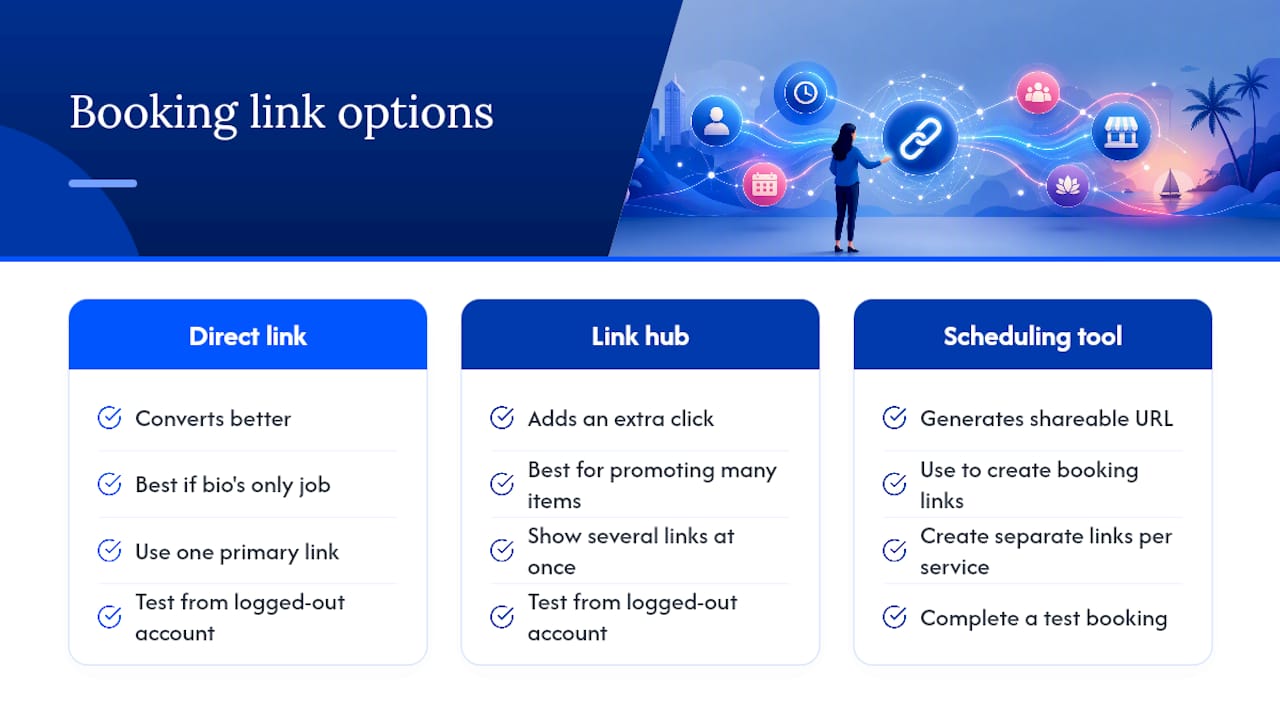
Can I use different booking links for different services? Yes. Create separate reusable links for each service type in your scheduling tool, then feature your highest-converting one in your bio and share the others through email or Story highlights.
Sources
- Share an appointment schedule
- Booking Links How-to Guide | Motion
- How to Create a Google Calendar Booking Link
- Free Booking Page for Your Link in Bio (2026): Skip the Calendly Stack