
Buy and Launch a Salon Client Portal in 5 Procurement Steps
Buy and Launch a Salon Client Portal in 5 Procurement Steps

A client portal that salon owners can actually call their own is a white-label platform: your booking system, your app, your client data, under your name. If you’re choosing between that and a marketplace listing, pick the branded portal. It’s the only structure that keeps client relationships, pricing, and brand equity with you instead of a third-party directory.
TL;DR:
- Branded portals retain client relationships, booking data, and brand identity, unlike marketplace listings which give control to third-party platforms.
- Full data export rights and provider-level controls are essential to avoid vendor lock-in and customized service management.
- Implementation involves discovery, migration, staff training, and launch, with timelines varying from weeks for templates to months for custom builds.
- Payment processing should support popular providers like Square and Stripe, with clear fee structures and data export guarantees.
- Owners benefit most when owning their client data long-term, especially if planning multiple locations or expanding, despite higher upfront setup efforts.
Table of Contents
- What Is a White-Label Salon Client Portal?
- Core Features To Look For In A Salon Client Portal
- How Does A Branded Portal Change Your Business?
- What Does It Cost To Launch A Branded Portal?
- What Payment And Integration Support Should You Expect?
- How Do You Choose And Launch The Right Portal?
- What Owners Get Wrong About Branded Portals
- Why Exclusively Fits Owners Who Want To Own Their Growth
- Sources
- FAQ
What Is a White-Label Salon Client Portal?
A white-label salon client portal is software built and hosted by a vendor but branded entirely as yours. Clients see your logo, your colors, your app icon on their home screen. They never see the vendor’s name.
This matters more than it sounds. On a marketplace-style booking app, the platform owns the client relationship. It controls the reviews, the search ranking, and often the messaging that reaches your clients after they book. A white-label system flips that: the salon owns the booking data, the client history, and the communication channel. That distinction shapes everything from marketing ROI to what happens if you switch providers later, a point SaaS Metrics lays out clearly when comparing marketplace versus branded software models.
What a genuine white-label portal should include:
- A branded website that looks like it was built for your business, not a template with your logo dropped in
- Native iOS and Android apps under your own brand name, not a shared marketplace app
- Booking, client records, and payment processing tied to your business, not a platform account
- Full data export rights so you’re never locked into one vendor
The practical outcome: you keep the client, the vendor keeps the software running in the background.
Core Features To Look For In A Salon Client Portal
Feature checklists for salon software tend to blur together. Here’s what actually changes daily operations once you’re using it.
- Branded website and native apps. Clients book through something that looks and feels like your business, not a generic directory page.
- Provider-level booking controls. Each stylist, barber, or suite tenant sets individual pricing, availability, and service menus rather than following one rigid house schedule.
- Client cards and appointment history. Formulas, preferences, past services, and notes attached to each client profile, which Neologic’s analysis of beauty-industry client portals flags as core to daily salon operations, not a nice extra.
- Payments and membership support. Recurring billing, package deals, and deposit collection built into the same system clients already used to book.
- Staff and multi-location management. Permissions that separate what a front-desk employee can see from what an owner or suite manager can access.
- Retention tools. Automated appointment reminders, push notifications, and loyalty tracking that reduce no-shows and bring clients back without manual follow-up.
- Data export and admin permissioning. The ability to pull your client list and history out of the system at any time, in a usable format.
Pro Tip: Ask any vendor to show you the export file format during the demo, not after you sign. If they can’t produce a clean, portable client list on the spot, treat that as a warning sign about how “yours” your data really is.
How Does A Branded Portal Change Your Business?
Brand ownership isn’t an abstract benefit. It changes what happens every time a client books, cancels, or refers a friend.
When bookings and client history sit inside your own branded system, every marketing dollar you spend builds equity you keep. A client who books through your app associates that experience with your business, not a third-party directory. Moxo’s research on branded client portals points to this as a retention engine: centralizing client interactions inside a brand-owned experience reduces the manual admin that eats front-desk hours, from phone tag over rescheduling to chasing no-show fees.
The upside shows up in three places:
- Fewer manual bookings. Staff spend less time on the phone and more time with clients in the chair.
- Higher retention. Clients with easy access to their appointment history and loyalty status book again more consistently, according to industry data on salon digital transformation, which links portal access to stronger engagement and higher portal-driven retail sales.
- Stronger perceived trust. A consistent brand experience, from the website to the app to the checkout, reads as more established than a listing buried in a marketplace.
None of this requires guesswork. It requires owning the system clients touch every day.
What Does It Cost To Launch A Branded Portal?
Rolling out a white-label portal typically follows four phases, and knowing them helps you set a realistic budget and timeline before you sign anything.
- Discovery and branding. The vendor gathers your logo, colors, service menu, and provider details to configure the branded experience.
- Migration. Existing client records, appointment history, and payment methods get imported from your old system.
- Training. Staff learn the booking interface, admin dashboard, and any provider-level pricing controls.
- Launch. The branded website and apps go live, often with a soft launch period before full rollout.
Template-based portals can go live in weeks, while custom native app builds or deep integrations stretch that timeline to months. The number of providers and the state of your existing client data also matter. A salon migrating clean records from one system moves faster than one merging spreadsheets from three different booking tools.
Cost drivers break down similarly: your subscription tier, whether you need a fully custom app build versus a templated one, which payment integrations you require, and the support response time you’re paying for. Pricing models vary by vendor, some charge flat subscriptions, others tack on per-booking or per-user fees that only show up at scale.
Before signing, ask every vendor for a written migration checklist: what gets imported automatically, what requires manual entry, and how long the cutover window runs.
What Payment And Integration Support Should You Expect?
Payment processing terms determine your actual margin on every transaction, so this deserves more scrutiny than most owners give it. Ask vendors directly about processing fees, settlement timing, and whether rates change at volume.
- Confirm the portal supports Square or Stripe processing, and read the actual terms rather than relying on a sales summary.
- Ask whether card readers and point-of-sale hardware are vendor-specific or work with equipment you already own.
- Check for APIs or connectors, branded portals generally support integrations with CRMs, accounting software, and marketing tools, which matters if you plan to add tools later without a full migration.
- Confirm data exportability in writing. Security basics and export rights should never be a verbal promise.
How Do You Choose And Launch The Right Portal?
Pick a portal the way you’d pick any long-term vendor relationship: on control, not just features.
- Score brand control first. Does the app carry your name on the home screen, or a shared marketplace icon?
- Verify migration support. Ask exactly what the vendor imports and what you’ll have to enter manually.
- Check pricing at scale. Get numbers for five providers and fifty. Some pricing models get expensive fast.
- Confirm app ownership. Ask who owns the app store listing if you ever switch vendors.
- Test support responsiveness. Contact support during the trial period before you’re a paying customer, not after.
During demos, ask directly: “Who publishes to the App Store and Google Play, and can we keep that listing if we switch platforms later?” A vendor that hesitates on that question is signaling lock-in.
Red flags worth walking away from: opaque pricing that only reveals itself at invoice time, marketplace-style contracts that route clients through a shared directory instead of your brand, and any refusal to guarantee data export in writing.
Pro Tip: Run a pilot with one location or a handful of providers for thirty days before switching your entire staff over. It surfaces training gaps and migration issues while the stakes are still low.
What Owners Get Wrong About Branded Portals
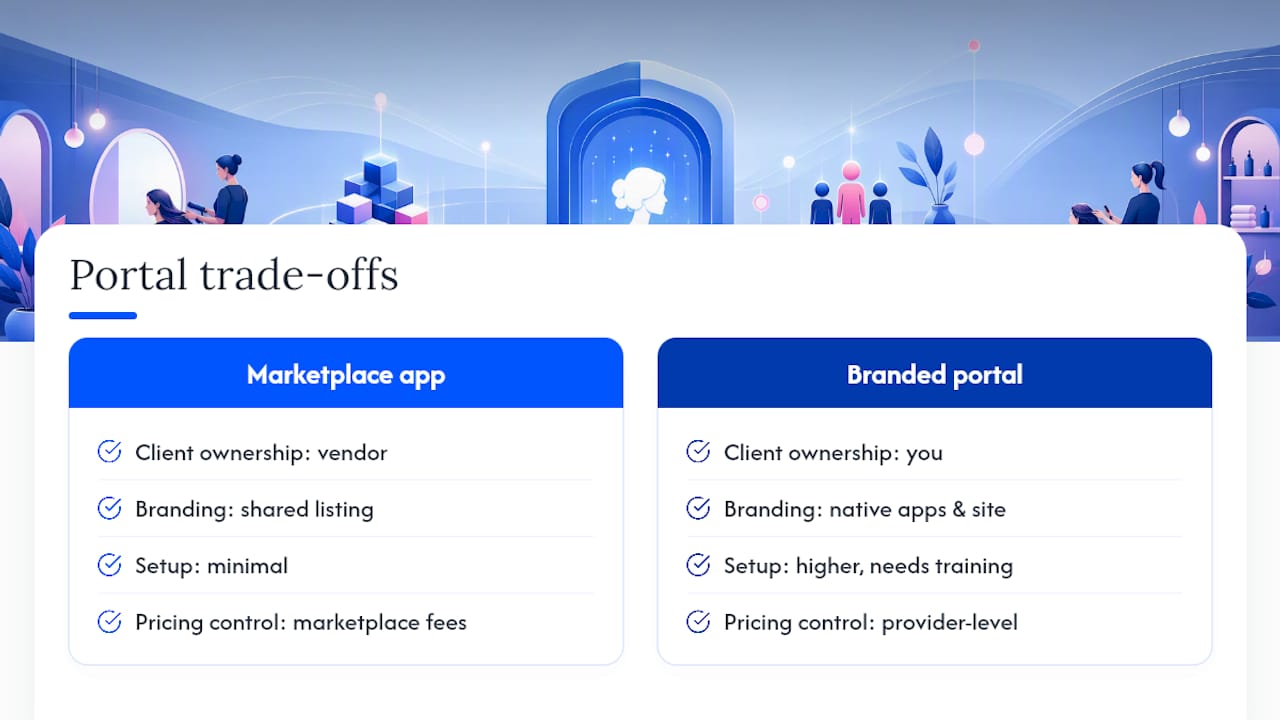
Most owners evaluate portals on price per seat or app polish. That’s the wrong lens. The right question is who owns the client relationship five years from now, when your subscription renews or a competitor undercuts the vendor’s marketplace fees.
Exclusively built its platform around that exact tension, giving barbers and beauty professionals a branded website, native apps, and provider-level pricing control instead of a shared listing. Owners who plan to add locations or bring on suite tenants tend to benefit most, since brand consistency compounds as the business grows. The trade-off is real: branded systems ask more of you upfront, in setup and training, than a plug-and-play marketplace app does.
— Service
Why Exclusively Fits Owners Who Want To Own Their Growth
Some platforms are built for salon owners and barbers who want to stop renting their client relationships from a marketplace. Every booking, client card, and review lives inside a platform carrying your name, not a shared directory.

The platform includes a custom branded website, native iOS and Android apps, provider-level pricing and availability controls, and integrated Square payment processing with transparent terms. Staff management, membership tools, and analytics come standard rather than as add-on fees that pile up later.
If you’re ready to compare options, start with the pricing breakdown to see how plans scale with your provider count, then review the appointment and booking features to see how provider-level controls work in practice. Owners weighing this against a marketplace-style vendor can check the direct comparisons on Exclusively versus Booksy or start a pilot with a single location to see how migration and training actually feel before committing your full staff.
Sources
- Marketplace or Your Own Brand? How to Choose Salon Software Without Regret - SaaS Metrics
- The retention engine: How a branded client portal turns experience into revenue | Moxo
- Digital Transformation In The Salon Industry Statistics 2026
FAQ
What Is A White-Label Client Portal For A Salon?
It’s a booking and client management platform branded entirely under your salon’s name, including the website and mobile app, rather than a shared marketplace listing.
Does A Branded Portal Cost More Than A Marketplace App?
Pricing varies by vendor and provider count, but branded portals typically run on subscription tiers rather than per-booking marketplace cuts, which can cost less at scale for growing salons.
Can I Export My Client Data If I Switch Vendors?
A legitimate white-label vendor should guarantee data export in writing; if a vendor won’t confirm this before you sign, treat it as a red flag.
How Long Does It Take To Launch A Salon Client Portal?
Template-based launches can go live in weeks, while custom app builds or complex data migrations often take several months.
Does Exclusively Support Square And Stripe Payments?
Exclusively integrates Square payment processing with transparent terms, letting salons handle bookings, deposits, and memberships inside the same branded platform.