
Salon Owners: Launch a Custom Domain Salon Website in 1–3 Weeks
Salon Owners: Launch a Custom Domain Salon Website in 1–3 Weeks
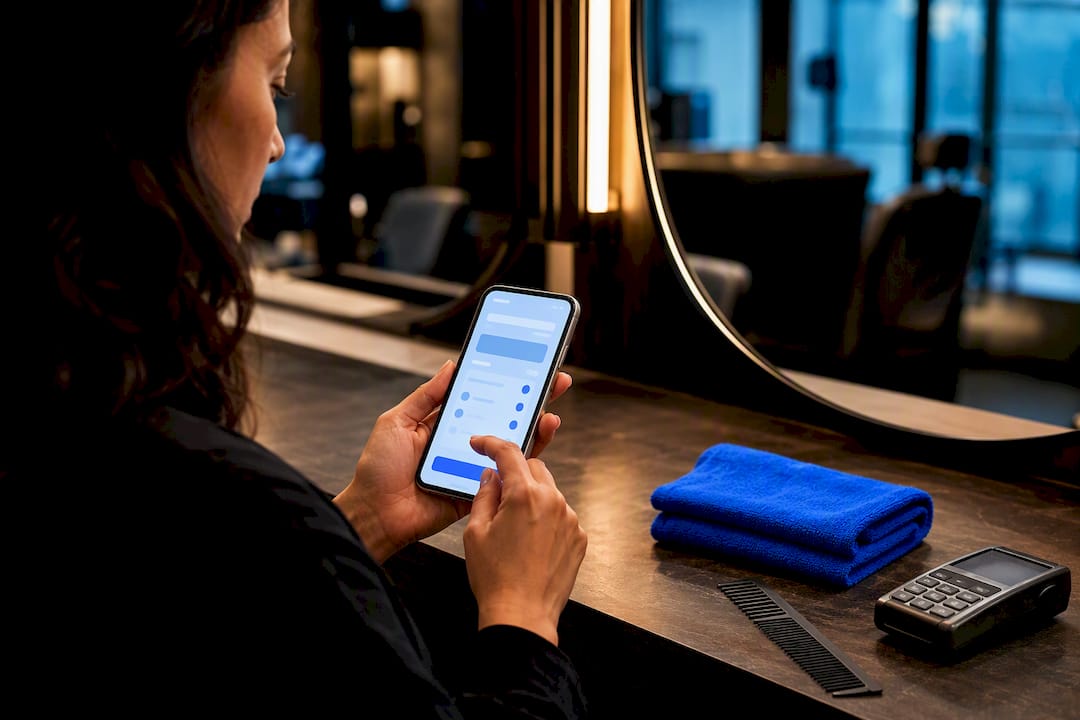
Yes, a salon website on a custom domain immediately increases trust and bookings compared to a free subdomain or social-only presence. The single next step is to register a domain that matches your brand name, then build or connect a site around it. If you want the fastest route to a fully branded, booking-ready platform, a specialist provider built for beauty professionals will get you there without a developer.
TL;DR:
- Using a custom domain significantly improves local search rankings, professional appearance, and client trust compared to subdomains or social media links.
- Domain options with industry-specific TLDs like .salon or .barber can improve availability and relevance, especially when matching your business name closely.
- The choice of platform—DIY builder, hosted salon system, or custom development—affects your launch timeline, costs, and level of control over features and branding.
- Connecting your domain requires updating DNS records, enabling SSL, and testing across devices, with buying through your hosting platform offering easier setup.
- Ongoing maintenance, backups, and regular review of booking and payment systems are essential to keep your salon website functional and optimized for conversions.
Table of Contents
- Why a Custom Domain Salon Website Matters
- How to Choose the Right Domain Name for Your Salon
- Website Builder, Hosted Salon Platform, or Custom Developer?
- Connecting Your Domain: The Technical Checklist
- Essential Features Every Salon Site Needs
- Launch Timeline and What It Costs
- How a Branded Platform Simplifies the Whole Process
- Picking a Registrar and Host Built for Salon Needs
- Moving Your Existing Domain to a New Platform
- Backup and Maintenance After Launch
- See What a Branded Salon Platform Looks Like
- What I’d Actually Do If I Were Opening a Chair Today
- Sources
- FAQ
Why a Custom Domain Salon Website Matters
A domain like “yoursalon.com” reads as a real business. A subdomain like “yoursalon.wixsite.com” reads as a placeholder. Clients notice the difference before they ever book, and so does Google.
Search visibility improves too. Custom domains rank better in local results and earn more clicks than generic builder subdomains, largely because they look more legitimate in a search result and carry your keywords naturally. A domain also gives you a professional email address (booking@yoursalon.com beats a personal Gmail for confirmations and marketing) and ties cleanly into your Google Business Profile, review links, and email campaigns.
Mobile matters most here. Salon searches skew heavily toward phones, and mobile-first design correlates with real traffic and conversion gains for service businesses. If your site loads slowly or the booking button is buried, you lose the client before they ever see your chair.
How to Choose the Right Domain Name for Your Salon
Start with your actual business name. If “yoursalon.com” is taken, resist the urge to bolt on random numbers or symbols.
- Match your brand first. Squarespace recommends staying as close as possible to your existing business name rather than inventing a new one for the web.
- Consider industry TLDs. Extensions like
.salonor.barbersignal exactly what you do and often have better availability than.com. - Add location only when needed. “Yoursalon.com” is cleaner than “yoursaloncityname.com” unless you have multiple locations or a crowded market where a city name helps you rank.
- Skip hyphens and odd spellings. They’re hard to say aloud and easy to mistype when someone’s texting a friend your name.
- Check for trademark conflicts and enable domain privacy before you publish, so your personal registration details stay off public WHOIS records.
- Set up branded email immediately. info@yoursalon.com should exist the day your domain does, not months later.
Website Builder, Hosted Salon Platform, or Custom Developer?
Three routes get you to a live domain. Which one fits depends on your budget, timeline, and how much control you want over provider-level details like pricing and availability.
- DIY website builders. Fast and cheap, good for a solo stylist comfortable dragging templates around, but you’ll handle booking integrations, SEO, and updates yourself.
- Hosted salon platforms. Built specifically for beauty businesses, these bundle booking, payments, and sometimes a branded mobile app into one system, which means less technical maintenance for you.
- Custom development. The right call for a multi-location brand with unusual booking logic or integration needs, but expect a longer build and a bigger invoice.
Run through a short checklist before deciding: your budget ceiling, your launch deadline, your comfort editing a website yourself, and whether you need provider-level control (each stylist setting their own hours and prices) or a native app under your own name.
Connecting Your Domain: The Technical Checklist
Once you’ve picked a name, the setup is mechanical, not mysterious.
- Buy or transfer the domain through a reputable registrar or directly inside your chosen platform.
- Update DNS records (A, CNAME, or ALIAS depending on your host’s instructions) to point the domain at your site.
- Enable HTTPS/SSL. Most modern platforms issue free certificates automatically, and domains purchased through annual hosting plans often include WHOIS privacy and SSL management out of the box.
- Set up 301 redirects if you’re moving from an old URL, and configure branded email through a service like Google Workspace.
- Test everything on a phone, a tablet, and a desktop before you tell a single client the site is live.
Pro Tip: Buying your domain through the same platform that hosts your site usually means one login, automatic renewal, and no DNS headaches. Buying it separately gives you more portability if you switch platforms later, so weigh convenience against long-term flexibility before you commit.
Essential Features Every Salon Site Needs
A pretty homepage that doesn’t book appointments is a business card, not a website. Every custom domain salon website needs a core set of working parts.
- A visible booking widget showing real provider-level availability, not a generic “contact us” form.
- A clear service menu with pricing, so clients aren’t guessing before they commit.
- A gallery and stylist profiles. Design guides built around dozens of real salon examples consistently point to large photography and clean layouts as the difference between a site that converts and one that doesn’t.
- Payments, deposits, and membership options to lock in bookings and cut down on no-shows.
- Local SEO basics, including individual service pages and an active Google Business Profile connected to your reviews.
- Fast mobile load times and a one-tap booking button. Given that most salon searches and conversions now happen on mobile devices, a slow mobile experience is the fastest way to lose a client who was ready to book.
Launch Timeline and What It Costs
Your timeline depends entirely on which route you picked above.
- DIY builder: roughly 1 to 7 days if you already have your photos and service list ready to upload.
- Hosted salon platform: typically 1 to 3 weeks, since booking rules, staff profiles, and payments need configuring.
- Custom development: 4 to 12 weeks or more, especially with custom integrations or multiple locations.
Costs scale the same way: a domain plus a DIY builder subscription runs the leanest budget, a hosted platform adds a monthly subscription that bundles booking and payments, and custom development means a larger one-time build fee plus ongoing hosting.
Before you announce the launch, run a full test: book a fake appointment end-to-end, process a test payment, check every page on a phone, confirm your Google Business Profile links correctly, and verify analytics are actually recording visits. Budget for renewals, your monthly subscription, and basic marketing every year after that, not just the launch cost.
How a Branded Platform Simplifies the Whole Process
Building all of this piece by piece, domain, booking system, payments, mobile app, is exactly the workload a specialist platform exists to remove. Exclusively provides a fully branded platform built specifically for barbers and beauty professionals, so the site carries your name and your look, not a generic template.
The platform bundles custom websites, booking, and payment processing into one system, which cuts down the number of vendors you’re stitching together. Individual providers can set their own pricing, availability, and service details inside the same branded site, which matters for suites and multi-chair shops where every stylist runs their calendar differently. Exclusively also offers branded mobile apps built specifically for barbershops, so clients book through an app carrying your name instead of a shared marketplace app.
Picking a Registrar and Host Built for Salon Needs
Not every registrar or host is a great fit for a service business that lives and dies by mobile bookings. A few things matter more here than they would for a basic blog.
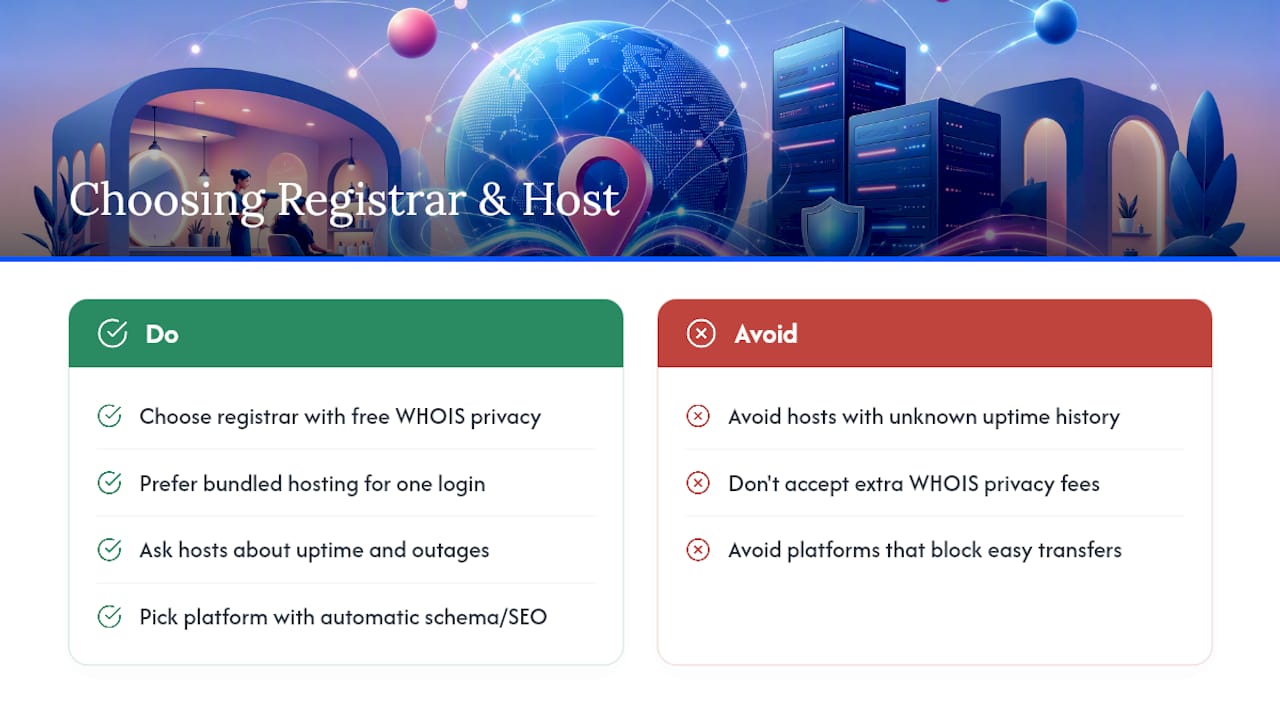
Look for a registrar that includes WHOIS privacy by default rather than charging extra for it. As Squarespace’s documentation notes, domains bought through annual hosting plans commonly bundle privacy protection and SSL management, which saves you a separate purchase decision later. If you’re comparing standalone registrars against a bundled platform, weigh the convenience of one login and one renewal date against the flexibility of keeping your domain independent of your hosting choice.
Hosting matters just as much as registration. A salon site with an embedded booking widget and payment processing needs consistent uptime, since a site that goes down during peak booking hours (weekend mornings, right after a payday) costs you real appointments. Ask any host or platform directly about uptime history and what happens to your booking data if their servers have an outage.
If local search visibility matters to your growth plan, and it should, look for a platform that handles structured data automatically and offers dedicated Salon SEO Services to help improve your local search visibility. Salon-focused site builders that auto-generate service and city pages with proper schema markup can shorten the runway to ranking for local searches, which matters more for salons chasing city-level keywords than for a single-location shop with an established reputation. A partner service focused specifically on SEO for salons can also help you close visibility gaps a template alone won’t fix.
Finally, confirm the registrar or platform makes domain transfer straightforward. Lock-in fears keep more salon owners on outdated sites than any actual technical obstacle.
Moving Your Existing Domain to a New Platform
Plenty of salon owners already own a domain, it’s just attached to an old site they’ve outgrown. Moving it doesn’t mean losing it, and the process follows a predictable sequence.
First, unlock the domain at your current registrar and request the transfer authorization code (sometimes called an EPP code). Most registrars require the domain to be at least 60 days old since its last transfer or registration, so check that window before you start.
Second, disable WHOIS privacy temporarily if your current registrar requires it for verification, then initiate the transfer at the new registrar or platform using that authorization code. Squarespace’s own domain documentation walks through this exact transfer flow, and most major hosts follow a similar process: submit the code, confirm ownership by email, and wait for the transfer window to close, typically 5 to 7 days.
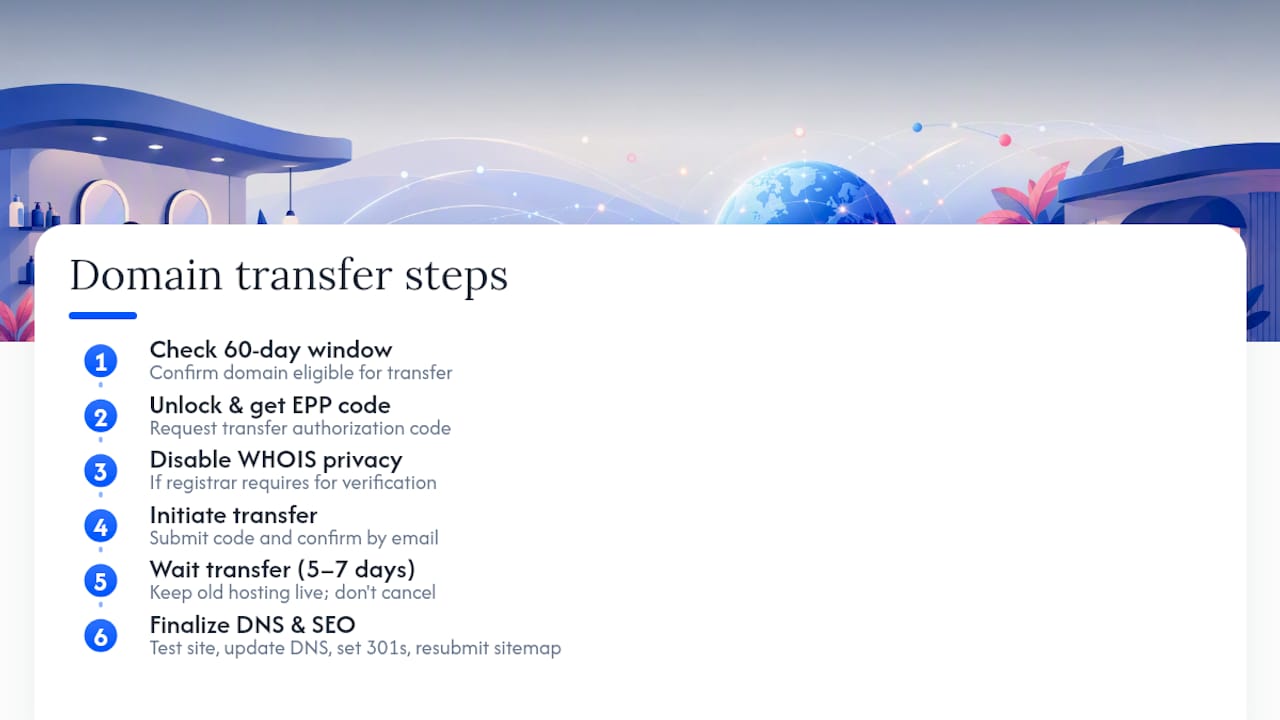
Third, and this is where owners lose sleep unnecessarily, keep your old site live until the new one is fully tested. Don’t cancel your old hosting the moment you submit a transfer request. Point your DNS records to the new platform only after you’ve confirmed the new site’s booking flow, payment processing, and mobile display all work correctly.
Fourth, set up 301 redirects from any old page URLs that changed structure, so bookmarked links and old search results still land somewhere useful instead of a dead page. Finally, resubmit your sitemap to Google and double-check your Google Business Profile still points to the correct URL. A domain transfer that skips this last step quietly bleeds search rankings for weeks before anyone notices why traffic dropped.
Backup and Maintenance After Launch
Launching the site is the beginning of the workload, not the end of it. Salon sites take more ongoing hits than a typical brochure site because they’re processing live bookings and payments daily.
Set an automatic backup schedule if your platform doesn’t already run one, most hosted platforms back up daily, but confirm it rather than assume it. Keep at least one manual backup before any major update to your service menu, pricing, or design, since a bad update mid-week can otherwise cost you a full day of bookings while you scramble to fix it.
Renew your domain registration well before its expiration date. Letting a domain lapse for even a day can hand it to someone else if it’s desirable, and recovering it afterward is expensive and sometimes impossible. Most registrars offer auto-renewal, turn it on and confirm your payment method stays current.
Check your booking flow and payment processing monthly, not just at launch. Payment processor terms and integrations occasionally change, and a broken checkout page during a busy Saturday morning is the worst possible time to discover it. Review your analytics quarterly to catch slow pages, broken links, or a booking step that’s quietly losing clients before they finish scheduling.
Budget for small ongoing costs beyond hosting: stock photo updates as your work evolves, occasional design refreshes, and time to update your service menu and pricing as your business changes. A salon site isn’t a one-time project, it’s a piece of your business that needs the same attention as your appointment book.
See What a Branded Salon Platform Looks Like
Everything covered above, domain, booking, payments, mobile app, branding consistency, is exactly what Exclusively bundles into one subscription instead of five separate vendors. You get a custom website on your own domain, a booking system with provider-level pricing and availability controls, integrated payment processing, and a branded mobile app your clients download under your salon’s name, not a shared marketplace app.

Before you reach out, have three things ready: your salon or barbershop brand name, a rough list of the features you actually need (booking, payments, an app, or all three), and whatever booking tool you’re currently using so the transition is easier to map out. From there, check Exclusively’s pricing to see which plan fits your shop size, or go straight to booking a call to walk through your specific setup with someone on the team.
What I’d Actually Do If I Were Opening a Chair Today
The trade-off is straightforward once you strip away the marketing noise: DIY builders win on cost and speed, custom development wins on uniqueness, and hosted specialist platforms win on the balance most salon owners actually need, booking and brand consistency without a developer on payroll.
My honest recommendation is to reserve your domain name today, even before you’ve picked a platform. Then, if bookings and a consistent brand across web and mobile matter more to you than tinkering with templates, schedule a demo with a hosted salon specialist and get a real requirements list in front of them. That single afternoon of prep saves weeks of second-guessing later.
— Service
Sources
- Salon Websites: 25+ Inspiring Examples (2026)
- Building a salon site – Squarespace Help Center
- How to Build a Salon Website in 11 Steps — Squarespace
- Hair Salon Website Builder - SEO-Ready Sites for Hair Salons & Stylists | Grow Local
FAQ
Do I Need a Custom Domain for My Salon Website?
Yes. A custom domain builds more trust than a free subdomain, supports better search visibility, and gives you a professional email address tied to your brand.
How Much Does a Custom Domain Salon Website Cost?
Costs range from a domain fee plus a low-cost DIY builder subscription on one end, to a monthly hosted-platform subscription, to a larger one-time custom development build on the other.
Should I Buy My Domain Through My Website Platform or a Separate Registrar?
Buying through your platform simplifies DNS and SSL setup with one login, while a separate registrar preserves more portability if you switch platforms later, so it comes down to how much you value convenience versus flexibility.
How Long Does It Take to Launch a Salon Website?
A DIY build can go live in as little as a week, a hosted salon platform typically takes 1 to 3 weeks, and custom development often runs 4 to 12 weeks or longer.
Can I Get a Branded Mobile App Along With My Website?
Yes. Platforms like Exclusively build branded mobile apps for barbershops and salons alongside the website, so clients book through an app carrying your business name instead of a shared marketplace app.