
Publish a Branded Salon App in 6 Steps, Payment Ready and No Code for Salons
Publish a Branded Salon App in 6 Steps, Payment Ready and No Code for Salons
Yes, you can publish a fully branded salon booking app to the Apple App Store and Google Play without writing a line of code. The fastest, lowest-risk route is a white-label platform that handles store submission and payments for you. Before you start, line up three things: developer accounts with both stores, your store listing assets, and a payment integration ready for real transactions.
TL;DR:
- Enrolling in the Apple Developer Program and Google Play Console requires a week of lead time for account approval and fee payments, which must be completed before submission.
- Asset preparation, including app icons, screenshots, descriptions, privacy policy URL, and store metadata, is often the most overlooked cause of app rejection or delays.
- Testing should include full appointment booking, staff calendar accuracy, live payment processing, and cross-device compatibility to prevent crashes or booking errors at launch.
- Apple review times tend to be longer than Google’s, so plan your launch date accordingly and address reviewer feedback promptly upon rejection.
- A white-label platform like Exclusively simplifies publishing and maintenance by providing a fully branded app, integrated payment system, and ongoing support, especially beneficial for multi-location salons.
Table of Contents
- How Do You Publish a Salon App Step by Step?
- What Assets and Accounts Do You Need Before Submission?
- Store Submission: Apple App Store vs. Google Play
- What Should You Test Before Launching Your App?
- Why a Branded Platform Beats a Generic Booking App
- Speed, Control, or Cost: What Actually Drives the Decision?
- How Exclusively Gets Your Salon App Live and Keeps It That Way
- Key Resources for Publishing and Running a Salon App
- Sources
- FAQ
How Do You Publish a Salon App Step by Step?
Publishing a salon app is really a sequence of small, checkable tasks rather than one big technical hurdle. Here’s the order that avoids the most common delays.
- Pick your build route. Decide between a white-label managed platform, a generic no-code app builder, or hiring a developer. For a brand-first salon business, a managed platform like Exclusively skips months of setup because the booking engine, payments, and store submission process already exist.
- Gather your brand assets and set up accounts. Logo files, screenshots, and your Apple and Google developer accounts need to be in place before anyone can submit anything.
- Connect your operational systems. Wire in booking, payment processing, push notifications, and your client database so the app actually functions the day it goes live.
- Run internal testing. Book fake appointments, run test charges, and check every staff calendar view before a single customer sees the app.
- Submit to both stores and soft launch. Push the build, wait for review, then release to a small group of regular clients first.
- Announce the launch. Send a text blast, post a QR code at the front desk, and email your client list with direct download links.
Pro Tip: Submit to Apple and Google on the same day if you can. Apple’s review tends to run longer, so starting both clocks together keeps your public launch date realistic instead of guessing.
Skipping step 4 is the single biggest reason salon apps get bounced back from review or, worse, go live and immediately generate complaints about broken bookings. No-code and AI-driven builders promise a fast path from idea to published app, but that speed only holds up if the booking and payment flows were actually tested before submission, not after complaints start rolling in, according to guidance from Adalo’s salon app walkthrough.
Multi-location salons need one more step folded into this list: confirming that each location’s calendar, staff list, and pricing pull correctly before the app goes anywhere near a store review team.
What Assets and Accounts Do You Need Before Submission?
Store submissions get rejected or delayed almost entirely because of missing paperwork, not because the app doesn’t work. Handle these before you touch the “Submit” button.
Developer accounts:
- Apple Developer Program membership, which runs about $99 a year
- Google Play Console, which charges a one-time registration fee rather than an annual one
Both of these enrollments require ID verification and, for Apple, sometimes a few business days of processing, according to pricing details noted by Appy Pie’s salon app builder. Budget a week of lead time here so account approval doesn’t stall your launch date.
Store listing assets you’ll need ready:
- App icon in the exact pixel dimensions each store specifies (these differ between iOS and Android)
- Screenshots sized for phones and tablets, showing real booking screens, not placeholder mockups
- A short description (under 30 words) and a longer description explaining your services and booking flow
- An optional but effective app preview video showing someone booking an appointment start to finish
- Your privacy policy URL, a support contact URL, and basic business metadata (category, age rating, contact email)
Statistic Callout: Two named line items alone, the Apple Developer fee and the Google Play registration, are the most-cited budget surprise in salon app launches, according to figures compiled by Appy Pie.
Payment setup deserves its own checklist item. If you’re using Square or Stripe, run a full sandbox transaction, a refund, and a receipt generation before you ever submit a build. Some platforms bundle this integration in rather than making you configure a merchant account from scratch.
Store Submission: Apple App Store vs. Google Play
Both stores want the same basic package: a completed app record, an uploaded build, and a filled-out listing. Where they diverge is in the details that trip up first-time submitters.
Apple App Store specifics:
- Upload your build as an IPA through Xcode or Transporter, then complete every field in App Store Connect
- Declare every permission your app requests (camera for photo uploads, location for salon-finder features, notifications for appointment reminders) with a clear explanation string
- Push notification setup requires an APNs certificate configured before you submit, not after
- Apple’s review notes field is your chance to explain any unusual functionality; use it, because reviewers reject apps they can’t quickly understand
Google Play specifics:
- Upload an Android App Bundle rather than a raw APK; Google requires this format for new apps
- Complete the content rating questionnaire honestly, since a mismatched rating is a common cause of listing removal later
- Set your target audience declaration, which affects what data practices Google requires you to disclose
- Use a staged rollout (starting at 5% or 10% of users) instead of a full release, so a bug affects a small slice of your client base, not everyone
Handling timelines and rejections:
- Apple’s review typically takes longer than Google’s; plan your public announcement date around Apple’s timeline, not Google’s.
- If rejected, read the specific reviewer note before resubmitting; guessing wastes another review cycle.
- You can appeal a rejection you believe is a mistake, but a straightforward fix and resubmission is usually faster.
- Once live, updates go through the same review process, so batch small fixes rather than submitting daily.
App-store submission demands specific listing assets and compliance with each store’s policies, along with testing across device types, and that requirement doesn’t relax after your first successful launch, per Adalo’s breakdown of the process.
What Should You Test Before Launching Your App?
A booking app that crashes during checkout does more damage to a salon’s reputation than not having an app at all. Test these before anyone outside your team sees the release build.
- Book a full appointment end to end, including a multi-service booking with add-ons
- Check every staff member’s calendar view for double-booking errors or missing availability
- Run a real payment through your sandbox environment, then switch to live mode and process one small real transaction
- Confirm receipts generate correctly and match what your point-of-sale records show
- Test on at least one older phone model and one current model for both iOS and Android
- Set up crash monitoring so you know within minutes, not days, if something breaks after launch
Pro Tip: Have your front-desk staff test the app on their own phones before launch, not just on a manager’s device. They’ll catch workflow friction a developer never would, because they’re the ones fielding client questions about it.
Booking platforms that support multi-location scheduling and reduce no-show rates only deliver that value if the integrations were actually verified pre-launch, a point echoed in scheduling-software guidance from Youcanbook.
Once testing clears, soft launch to an internal beta group first (your own staff), then a limited release to maybe 50 to 100 regular clients. Watch install numbers, completed bookings, and crash rate for a week or two before pushing the app to your full client list.
Why a Branded Platform Beats a Generic Booking App
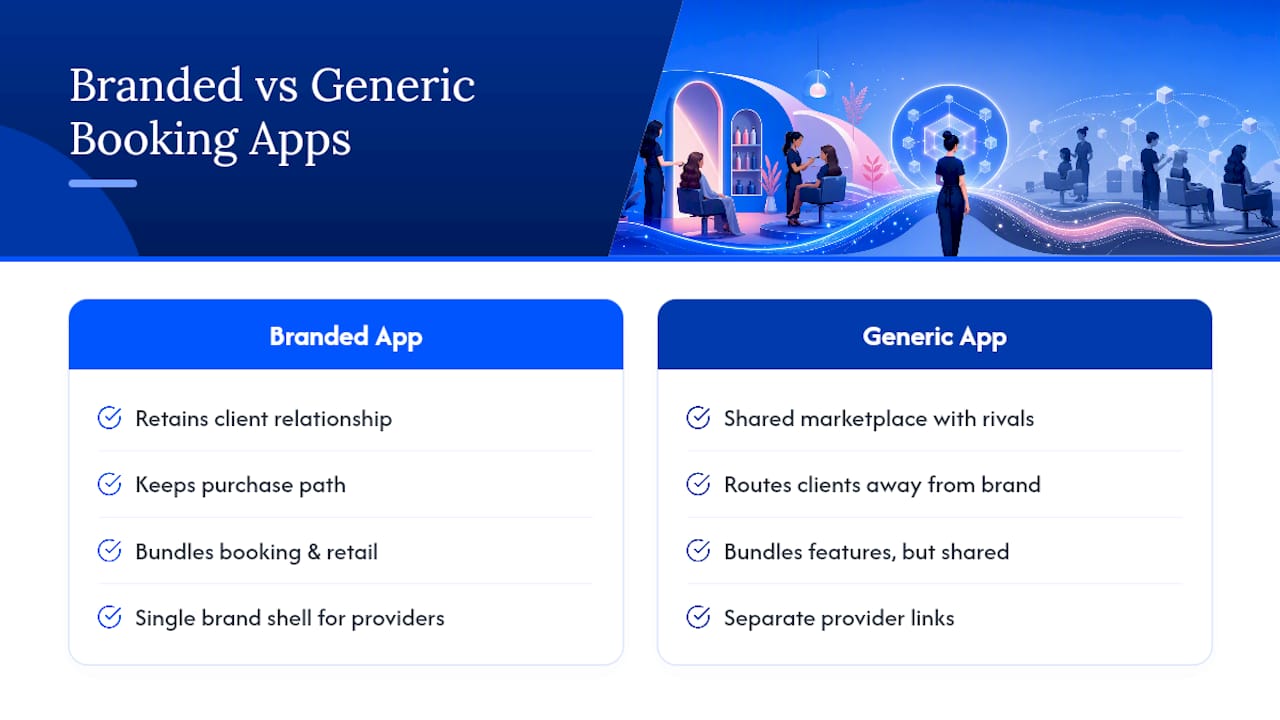
Client relationships live inside whichever app people open first. A white-label salon app keeps that relationship, and the purchase path that comes with it, inside your own branded experience instead of routing clients through a shared marketplace app where three competing salons show up on the same screen, according to reporting from Salon Today.
That same reporting notes that platform-built salon apps commonly bundle booking, stylist profiles, service menus, and retail features specifically to cut front-desk workload and lift revenue per client. Certain platforms build around that same logic: individual stylists and providers set their own pricing, availability, and service details inside one consistent brand shell, so a multi-chair suite doesn’t need six different booking links to manage six different providers.
Large beauty brands have already bet on this model. Olaplex launched a dedicated app for professional stylists specifically to deepen its relationship with the salon industry and drive product sales, a signal that a specialized, branded app does real commercial work beyond convenience, as Glossy reported.
Custom websites paired with a branded app double down on that consistency, giving clients the same look whether they book from a phone, a laptop, or a QR code taped to your mirror.
Speed, Control, or Cost: What Actually Drives the Decision?
Most salon owners frame this as a technology choice. It’s really a trade-off between three things that pull against each other: how fast you launch, how much brand control you keep, and what you pay long-term.
DIY builders win on upfront cost and lose on your time. You’ll spend evenings configuring push notifications and payment webhooks instead of running your business. Hiring a developer wins on customization and loses on both speed and budget, often stretching a three-month project into eight. A managed white-label platform trades a small monthly fee for skipping the technical setup entirely, which is why it tends to be the better call for any salon with more than one chair or more than one location, where consistency across staff calendars matters more than owning every line of code.
The maintenance question rarely gets asked upfront, but it should. Someone has to handle store policy updates, OS version changes, and payment provider requirements every single year the app stays live. Multi-location salons especially should weigh who that someone is before they commit to any route.
— Service
How Exclusively Gets Your Salon App Live and Keeps It That Way
Exclusively is the alternative to hiring a developer or wrestling with a generic app builder: you get a fully branded app under your own name, published to both stores, with booking, Square payments, and your website all working from one system instead of five disconnected ones.

Onboarding typically means handing over your logo, service menu, and staff list, then walking through store account setup together rather than alone. Setup includes the branded mobile app itself, a matching custom website, and payment processing already configured for real transactions, not a sandbox demo you have to migrate later. Every checklist item covered above, developer accounts, store assets, payment testing, comes bundled into that process instead of landing on your plate alone.
If you’re comparing your options against other booking platforms, see how the feature set stacks up against SQUIRE or check Exclusively’s pricing for websites, booking, and mobile apps to see which plan fits your chair count. Ready to see it running with your own branding? Book a call and get a specific timeline for your salon.
Key Resources for Publishing and Running a Salon App
- Apple Developer Program and Google Play Console for store enrollment
- Booking help videos for setup walkthroughs after launch
- Customer retention strategies to pair with your new app
Sources
- The Salon App that Could Transform the Industry | Salon Today
- How to Make a Hair Salon App Without Coding 2026
- Olaplex launches app for professional hair stylists in aim to be tech-focused | Glossy
FAQ
What’s the best app for salon management?
The best option depends on chair count and how much brand control you want. A white-label platform like Exclusively suits salons that want their own name on the app store listing, while generic booking tools work fine for a single-chair operation with simple needs.
Which salon apps are best for clients?
Clients respond best to apps that load fast, show real-time staff availability, and let them pay without leaving the app. A branded app tied directly to your salon, rather than a shared marketplace listing, keeps that experience consistent every time a client books.
How do you promote your salon app on social media?
Post the direct download link and a QR code across your existing profiles, announce the launch to your email and text list simultaneously, and ask staff to mention it during checkout for the first two weeks after publishing.
Is there a good free POS system for salons?
Free point-of-sale tools exist, but most cap transaction volume or lack booking integration, which forces salons to reconcile two separate systems. A payment setup built into your salon app, like Square integration through Exclusively, avoids that reconciliation problem entirely.
How long does it take to publish a salon app?
Once assets and accounts are ready, store review typically adds another one to two weeks on top of your build and testing time. Using a managed platform to prepare the submission usually shortens the overall timeline compared to building and testing from scratch.