
Salon App Costs: Monthly Dollars for Solo, Small & Multi-Location
Salon App Costs: Monthly Dollars for Solo, Small & Multi-Location

Most salons pay somewhere between $0 and $500 a month for booking software, while a fully custom app runs $8,000 to $30,000 or more upfront plus annual maintenance. The right choice depends less on sticker price and more on your monthly revenue and chair count: a solo stylist rarely needs custom development, while a five-location chain often outgrows subscription software fast. Start by pulling your last three months of card revenue, then match that number against the tiers below before you sign anything.
TL;DR:
- Small salons with up to eight chairs typically pay $50 to $200 per month, but add-ons like SMS and extra staff accounts can increase costs by 25 to 75 percent.
- Processing fees for card transactions can amount to roughly $750 a month at $25,000 in monthly revenue, often surpassing subscription costs over time.
- Custom-built salon apps generally cost $8,000 to $30,000 upfront, with ongoing annual maintenance of about 15 to 20 percent of the initial cost.
- A bundled platform offering booking, website, payments, and support can significantly reduce total ownership costs by eliminating multiple vendor fees and integration issues.
- Running parallel systems during the switchover process reduces client rebooking errors and avoids costly post-launch troubleshooting.
Table of Contents
- What Drives Salon App Cost: SaaS Subscriptions vs. Custom-Built Apps
- How Much Does Salon Software Cost Per Month? Real Tier Breakdowns
- How Payment Processing Fees Add to Your Monthly Salon App Cost
- Hidden Fees and the True Cost of Ownership Behind the Subscription Price
- What Does It Cost to Build a Custom Salon App?
- How to Choose and Budget for Your Salon App: A Step-by-Step Worksheet
- What Salon Owners Who Switched Platforms Wish They’d Known
- Cut Your True Salon App Cost With One Bundled Platform
- Sources
- FAQ
What Drives Salon App Cost: SaaS Subscriptions vs. Custom-Built Apps
Two completely different cost structures compete for your budget, and confusing them is how salon owners end up overpaying or underbuilding.
A SaaS subscription (Software as a Service) means you’re renting access to software someone else built, hosts, and maintains. Your monthly fee covers server hosting, the core booking engine, routine updates, and usually some level of customer support. You don’t own any code, and you can’t rebuild the interface from scratch, but you also don’t need a developer on call. This is why subscription pricing for salon booking software spans such a wide range, from free entry tiers to $165 or more per month, depending on how many features you actually use.
Custom development flips that arrangement. You pay once (or in phases) for a team to design and build an app that belongs to you, then you own the ongoing costs of keeping it alive: hosting, security patches, app store compliance, and feature updates. Nobody bundles those costs into your invoice automatically. You have to plan for them yourself, which is the step most first-time buyers skip.
Here’s the practical difference in what each model actually pays for:
- SaaS subscription: hosting, shared infrastructure, core booking and calendar features, standard integrations, basic support tickets, automatic security patches.
- Custom build: original design work, custom-coded booking logic, unique integrations (loyalty programs, specific POS systems), full ownership of the codebase, and no per-seat licensing fees.
- What stays a recurring cost either way: payment processing fees, SMS or email notification costs, and any third-party API calls (like mapping or identity verification).
- What custom eliminates: monthly software licensing fees paid to a third party, since you own the product outright.
The break-even math matters more than either price tag alone. If you’re paying $150 a month for a mid-tier SaaS plan, that’s $1,800 a year, or $9,000 over five years, which lands right in the middle of a basic custom app’s price range. A single-location salon doing $15,000 a month in revenue almost never clears that break-even point fast enough to justify custom development. A ten-location group doing $500,000 a month, paying for ten separate staff-seat licenses across multiple platforms, often does. Scale is the variable that flips this decision, not personal preference for “owning” your software.
How Much Does Salon Software Cost Per Month? Real Tier Breakdowns
Salon app pricing tends to cluster into three recognizable bands, and knowing which one fits your operation before you start shopping saves hours of demo calls.
-
Solo stylist or micro-salon (one to two chairs): Expect $0 to $50 a month. At this tier you typically get online booking, a basic client list, automated appointment reminders, and simple calendar sync. Free tiers exist, but they usually cap your client list size or strip out SMS reminders, pushing you toward the paid tier within a few months of real use.
-
Small salon (three to eight chairs, one location): Budget $50 to $200 a month. This tier adds multiple staff logins, class or group-booking support, basic marketing tools like email campaigns, and more detailed reporting. SMS reminders, which most salons treat as essential rather than optional, often cost extra here. Add three or four staff accounts on top of a $79 base plan and you can realistically land closer to $150 a month once everyone’s actually using the system.
-
Multi-stylist or multi-location salons: Enterprise tiers run $200 to $500 or more monthly. You’re paying for cross-location scheduling, centralized inventory and payroll reporting, advanced analytics, and dedicated account support. Vendors justify the jump with the operational complexity of running several booking calendars, tax jurisdictions, and staff rosters under one system.
The gap between a plan’s list price and what you actually pay each month is where most owners get surprised. A vendor’s marketing page shows the base tier, but real usage adds SMS credits, extra staff seats, and sometimes a fee just to accept card-on-file payments. Industry pricing guides consistently flag that owners should budget 25 to 75% more than the advertised base price once those additions are counted in.
| Tier | Monthly range | Typical inclusions |
|---|---|---|
| Solo / micro-salon | $0 to $50 | Booking, basic calendar, limited client list |
| Small salon | $50 to $200 | Multi-staff logins, SMS add-on, marketing tools |
| Multi-location / enterprise | $200 to $500+ | Cross-location scheduling, advanced reporting, dedicated support |
Pro Tip: Ask every vendor for a sample invoice from an existing client at your approximate size, not just the pricing page. The pricing page shows the floor; the invoice shows the real number.
How Payment Processing Fees Add to Your Monthly Salon App Cost
Processing fees are the cost most owners underestimate, because they’re expressed as a percentage instead of a dollar figure, and percentages hide their real weight until you do the math against your actual revenue.
Rates for card-not-present and card-on-file transactions in the salon space typically fall between roughly 2.2% and 3.5% or higher per transaction, sometimes with a small flat fee added per swipe. Some booking platforms bundle their own processing rate into your subscription, while others let you connect a processor like Square or Stripe directly, which can mean better rates at higher volume but an extra account to manage. Getexclusively integrates Square payment processing directly, so you’re not stitching together a separate merchant account on top of your booking software.
- Low-volume salon ($8,000/month in card revenue): roughly $240 a month in processing fees.
- Moderate-volume salon ($25,000/month in card revenue): roughly $750 a month.
- High-volume salon ($60,000/month in card revenue): roughly $1,800 a month.
A three-chair salon doing $25,000 a month in card sales pays close to $9,000 a year just in processing, before subscription fees or add-ons enter the picture. That’s often more than the software subscription itself, yet it rarely gets budgeted with the same seriousness.
Beyond the headline rate, check the fine print for refund and chargeback handling. Some processors return the full transaction fee on a refund, others keep a portion. Payout delay policies also vary. A platform that holds funds for two or three business days before depositing them into your account can strain cash flow for a salon running tight on payroll timing, so it’s worth confirming payout speed before signing a contract, not after your first slow month.
Hidden Fees and the True Cost of Ownership Behind the Subscription Price
The number on a pricing page is rarely the number that shows up on your card statement six months later. Vendor pricing guides and comparison sites consistently understate real total cost of ownership because they list base tiers without the add-ons nearly every salon ends up needing.
Watch for these recurring hidden costs before you sign anything:
- SMS and email notification credits. Many platforms charge per message or bundle a limited monthly allotment, with overages billed separately.
- Extra staff accounts. Adding chairs or booth renters beyond your plan’s included seat count often triggers per-seat fees.
- API or integration access. Connecting third-party loyalty programs, accounting software, or marketing tools sometimes requires an upgraded tier.
- Refund and chargeback fees. Processors may keep their transaction fee even after refunding the client, and disputed charges usually carry their own penalty.
- Onboarding or setup fees. Some vendors charge a one-time setup cost, particularly for data import from a previous system.
Then there are the soft costs, which don’t appear on any invoice but hit your bottom line just as hard. Migrating between platforms takes staff time to learn a new interface, and most salons see a short dip in booking volume while clients and staff adjust to a new system. None of that shows up in a vendor’s pricing table.
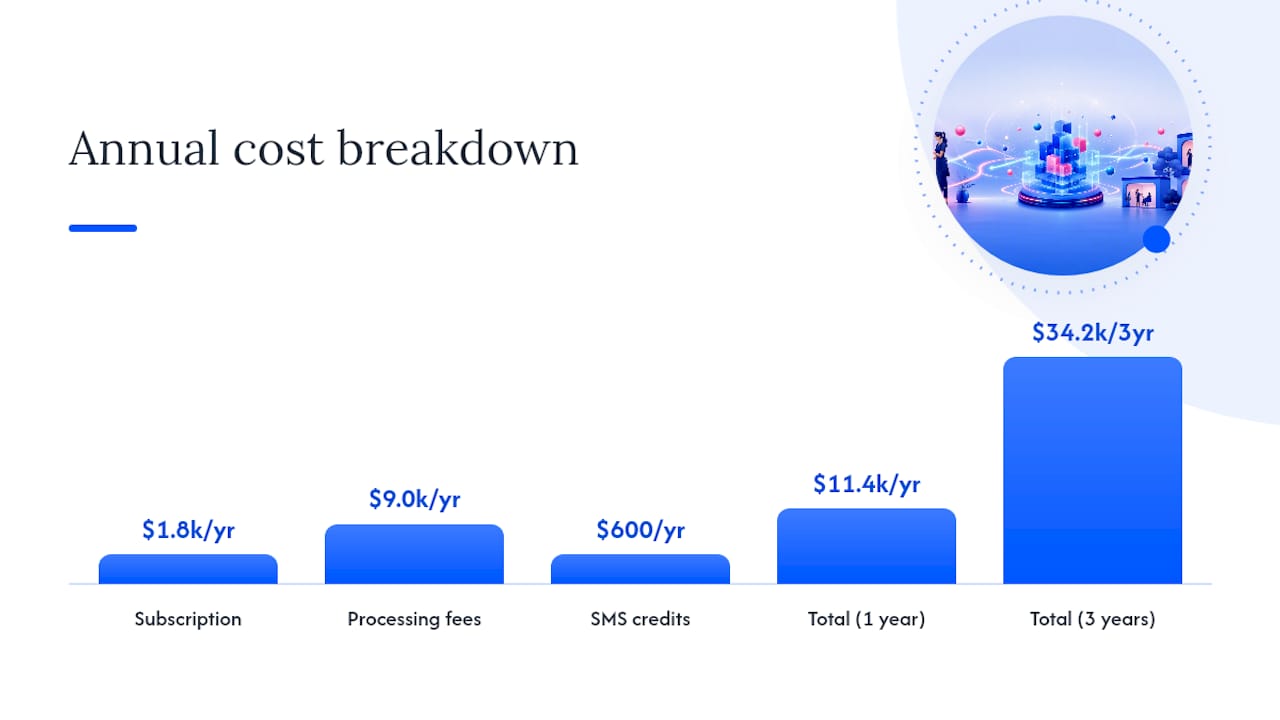
To calculate a realistic total cost of ownership over one to three years, add up: (subscription fees × 12 or 36 months) + (estimated processing fees based on your revenue) + (add-on fees you know you’ll need, like SMS) + (one-time migration or training costs). A salon paying $150 a month in subscription, $750 a month in processing, and $50 a month in SMS credits is looking at roughly $11,400 a year before any one-time setup costs, and closer to $34,200 over three years.
Pro Tip: Before signing a contract, ask the vendor for their full add-on price sheet, not just the tiers listed on the marketing page. If they hesitate to send it, that hesitation tells you something.
What Does It Cost to Build a Custom Salon App?
Custom development costs scale with feature complexity, and the range is wide enough that a vague quote from a developer should raise questions rather than close the deal.
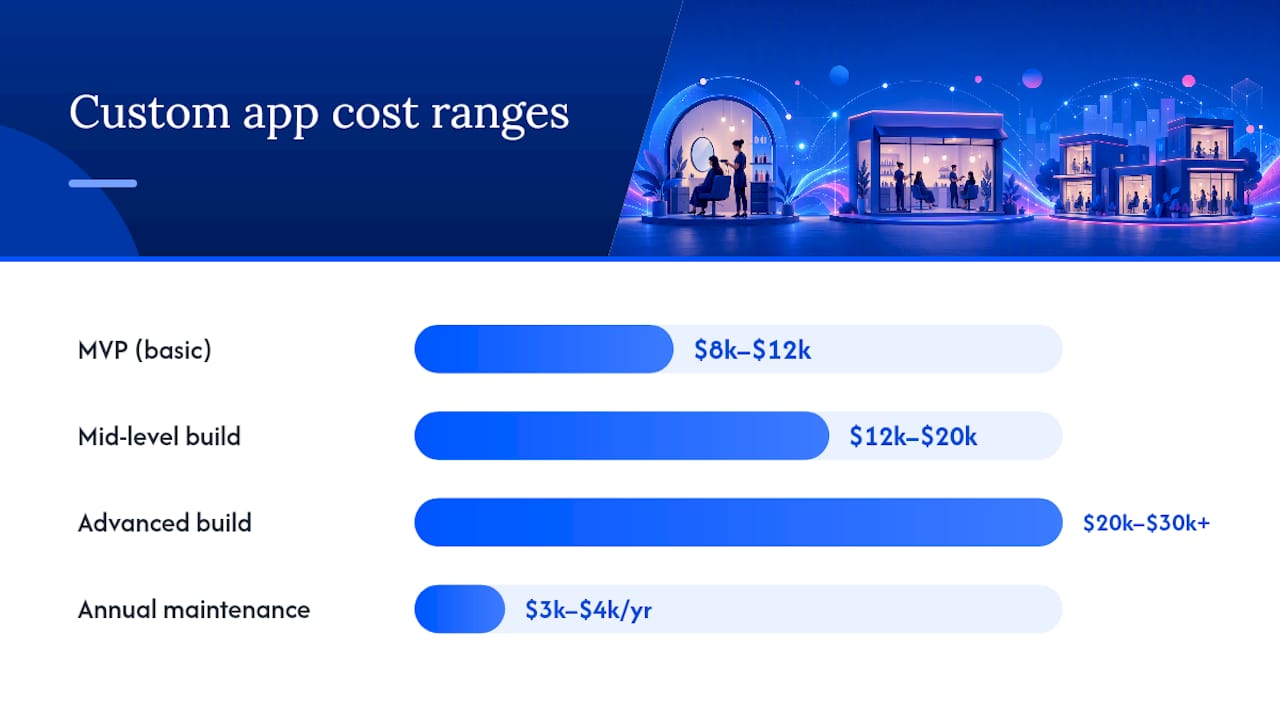
An MVP, or minimum viable product, with basic booking, a simple client database, and calendar sync typically runs $8,000 to $12,000. This gets you a functional app, but usually without native iOS and Android versions, meaning it might run through a mobile browser instead of a downloadable app store listing.
Mid-level builds, which usually add native app store presence, payment integration, and basic push notifications, land in the $12,000 to $20,000 range. Advanced builds with multi-location support, custom analytics dashboards, loyalty program logic, and deeper third-party integrations climb to $20,000 to $30,000 or more.
What actually drives that spread:
- Native vs. hybrid development. True native apps for both iOS and Android cost more than a single cross-platform build but perform better and feel more polished to clients browsing the app store.
- Multi-location logic. Syncing inventory, staff schedules, and reporting across several sites is a meaningfully harder engineering problem than single-location booking.
- Custom integrations. Connecting a specific accounting platform, a proprietary loyalty system, or a niche marketing tool adds development hours that off-the-shelf software already solved for everyone else.
- Design complexity. A fully custom brand experience, unique animations, and bespoke visual identity take longer to build than a templated interface.
Where your developer sits on the map changes the number substantially. Hourly rates in the US and UK run considerably higher than rates in Eastern Europe or India, which is why offshore teams often quote lower totals for comparable scope. The trade-off is usually communication speed and time zone overlap, not necessarily code quality, but it’s a real trade-off worth weighing against your own tolerance for async project management.
Once the app launches, maintenance becomes its own recurring line item. The standard guidance is to budget a notable portion of your initial development cost annually for hosting, security patches, operating system compatibility updates, and small feature fixes. On a $20,000 build, that’s $3,000 to $4,000 a year, every year, for as long as the app exists. Owners who skip this maintenance cost in their planning risk running an app on outdated frameworks, leading to accumulating technical debt.
How to Choose and Budget for Your Salon App: A Step-by-Step Worksheet
Deciding between SaaS and custom development gets easier once you run your own numbers instead of comparing vendor claims against each other.
Start with a short prioritization checklist:
- How many chairs, staff members, and locations do you operate today, and where do you expect to be in two years?
- What’s your average monthly card revenue over the last quarter?
- Do you need deep brand control (a fully custom-branded app and website), or is a templated booking interface acceptable?
- Which integrations are non-negotiable (specific POS system, loyalty program, accounting software)?
From there, the budgeting process follows four steps:
- Forecast your monthly revenue. Use your last three to six months of actual card sales, not a hopeful projection.
- Estimate processing fees. Multiply your monthly card revenue by roughly 3% to get a realistic monthly processing cost.
- Pick your model. If your break-even against custom development sits beyond three years, subscription software is almost always the more efficient choice. If you’re running multiple locations with heavy brand requirements, custom or a bundled branded platform starts to make more financial sense.
- Add migration, training, and launch marketing. Budget for staff training hours, a short dip in bookings during transition, and any promotional push to get clients using the new system. A salon SEO strategy to rebuild visibility after a platform switch is worth pricing into this step too, since a new booking link or app often needs its own marketing push to get discovered again.
Here’s how that plays out for three different salon profiles:
| Profile | Recommended model | Estimated monthly cost |
|---|---|---|
| Solo stylist | SaaS, entry tier | $30 to $75 including processing |
| 4-chair salon | SaaS, mid tier | $240 to $1,800 including processing and SMS |
| Multi-location (5+ sites) | Custom or bundled branded platform | — including processing, maintenance, and staff seats |
Before signing with any vendor, ask directly: What’s included in the base price versus billed as an add-on? What’s the payout schedule for card transactions? What does data export look like if we leave? Is there a contract term, or can we cancel monthly? A vendor that answers all four without hedging is usually one worth trusting.
Pro Tip: Request a 30-day free trial or month-to-month contract option before committing annually. A vendor confident in their product rarely needs to lock you in for twelve months to prove its value.
What Salon Owners Who Switched Platforms Wish They’d Known
The regret salon owners mention most often after switching platforms isn’t the subscription price. It’s the SMS overage they didn’t budget for, the two weeks of confused clients rebooking through the wrong link, and the staff training time nobody put on the calendar.
The safest way to avoid that is running a 30 to 60 day parallel period where your old and new systems operate side by side. Confirm that payments settle correctly, bookings sync without double entries, and client notifications actually go out before you cut over completely. Skipping this step to save a few weeks almost always costs more time later, fixing missed appointments or duplicate charges.
One thing that consistently reduces this friction: choosing a platform where booking, payments, and your branded app all live under one system from the start, rather than stitching together separate vendors that each have their own login, their own support line, and their own way of exporting your client data.
— Service
Cut Your True Salon App Cost With One Bundled Platform
Every fee stack covered above, subscription tiers, processing rates, SMS add-ons, per-seat charges, gets simpler math when it comes from one vendor instead of three. Getexclusively bundles a fully branded website, native iOS and Android mobile apps, online booking, Square payment processing, and membership management into a single subscription built specifically for barbers and beauty professionals.

Instead of paying separately for a booking platform, a web developer, and a payment processor, and then troubleshooting how those three systems talk to each other, you get one bill and one support line. Providers keep control over their own pricing, availability, and service details inside a platform that carries your brand, not a generic template shared with every other salon in your city. That’s the kind of consolidation that lowers total cost of ownership in practice, not just on paper. Check current pricing plans to see which tier fits your chair count and revenue, or book a call to walk through your specific numbers before you decide between subscription software and a custom build.
Sources
- Salon App Development Cost Breakdown: Build Your Beauty App — DevTechnosys
- How to avoid software switching costs — Software Advice
- The Salon App Pricing 2026: Real Costs, Fees & What Others Paid — PricingNow
FAQ
Which Salon App Is Best?
The best choice depends on your size and goals: SaaS platforms suit solo stylists and small salons that want quick setup and low upfront cost, while a bundled branded platform like Getexclusively fits salons that want a custom app and website without piecing together multiple vendors.
How Much Does Salon Software Cost?
Monthly subscription pricing typically ranges from $0 to $50 for solo stylists up to $200 to $500 or more for multi-location salons, while custom-built apps run $8,000 to $30,000 or more as a one-time development cost plus annual maintenance.
Is There a Free Salon Booking App?
Some platforms offer free entry tiers, but they usually limit client list size, strip out SMS reminders, or cap staff accounts, so most growing salons move to a paid tier within their first few months of real use.