
Salon SMS Reminders: What Actually Cuts No-Shows in 2026
Salon SMS Reminders: What Actually Cuts No-Shows in 2026
SMS reminders are the single most effective way to stop salon no-shows, and they beat email and phone calls by a wide margin. SMS messages get opened around 98% of the time, compared to roughly 20% for email, and most replies land within minutes. Salons using automated SMS reminders report no-show drops averaging around 35%, with Phorest data putting salon-specific reductions at about 33%.
The fastest path to those numbers is a two-message cadence: one reminder 24 hours before the appointment, a second 2 to 4 hours out. Both messages should allow two-way replies, so a client texting back “C” to confirm or “R” to reschedule automatically updates your calendar instead of creating a to-do for your front desk.
You can get this running today with three moves:
- Connect your calendar or booking software so appointment data flows into the SMS system automatically.
- Turn on the SMS channel and confirm two-way replies are enabled, not just outbound blasts.
- Build two templates (24 hour and 2 to 4 hour), then switch on delivery tracking so you can see what’s actually landing.
Quick stat: Salons switching from email-only reminders to SMS often see improvements in the first few weeks, once the reminder cadence and reply handling are dialed in.
Key Takeaways
SMS reminders cut salon no-shows because clients see and respond to texts within minutes, not days, and a two-message cadence tied to two-way replies turns that speed into fewer empty chairs.
| Point | Details |
|---|---|
| Use a two-message cadence | Send one reminder 24 hours out and a second 2 to 4 hours before, adding a third for long or high-value services. |
| Enable two-way replies | Map simple reply codes (confirm, reschedule, cancel) to automatic calendar updates to cut manual staff work. |
| Track delivery, not just sends | Monitor delivery status, confirm rates, and no-show rate changes weekly during your first pilot month. |
| Document consent and opt-outs | Capture SMS consent at booking and honor opt-out replies immediately to stay compliant with CTIA and GDPR rules. |
| Consolidate booking and reminders | Exclusively pairs branded booking, mobile apps, and Square payments so reminder data stays accurate across one system rather than several. |
Table of Contents
- How Salon SMS Reminders Work: Triggers, Personalization, and Delivery
- What’s the Best Reminder Cadence and Templates for Salons?
- How Does Two-Way SMS Handle Confirmations and Reschedules?
- Which Integrations Make SMS Reminders Actually Reliable?
- How Do You Measure the Impact of SMS Reminders?
- Pricing Models and the Feature Checklist That Actually Matters
- Step-by-Step Setup Checklist for Rolling Out SMS Reminders
- How Exclusively Supports Salon SMS Reminders
- Segmenting Clients for Reminders That Actually Land
- Protecting Client Privacy and Data in Your SMS System
- Consent, Opt-Outs, and Staying Compliant With SMS Reminders
- A Brief Note on Piloting This the Right Way
- Get Your Salon’s SMS Reminders Running Without the Patchwork
- Sources
How Salon SMS Reminders Work: Triggers, Personalization, and Delivery
Every SMS reminder starts with a trigger. Most systems fire off a message the moment a booking is created, confirmed, or rescheduled, then queue the follow-up reminders based on the appointment time. You can also send manual reminders for walk-ins or last-minute fills, which matters more than people expect. A stylist with a 4pm cancellation and a full waitlist needs to text six people in under a minute, not copy names into a group chat.
Personalization tokens are what keep automated messages from sounding robotic. A basic template pulls in the client’s first name, the service booked, and sometimes the assigned stylist: “Hi Maria, your balayage with Jenna is tomorrow at 2pm.” Some platforms let you add tokens for appointment duration, location (for multi-chair or multi-location salons), and prep instructions specific to the service.
Delivery isn’t guaranteed on the first attempt. A number gets ported, a carrier hiccups, a phone is off. Solid systems build in failover: if an SMS bounces, the platform can automatically retry, then fall back to email or an automated voice call so the reminder still reaches the client through another channel.
SMS wins over the alternatives for one simple reason: speed of response. Email gets checked once or twice a day if you’re lucky. Phone calls get screened and ignored. A text sits on the lock screen and gets a reply, often within minutes, which is the entire reason SMS reminders outperform every other channel for time-sensitive appointment management.
Key mechanics to get right:
- Set triggers on booking creation, confirmation, and manual send, not just the calendar date.
- Use tokens for name, service, staff member, and location if you run more than one chair.
- Build in an email or voice fallback for failed SMS deliveries.
- Track delivery status per message, not just per campaign.
What’s the Best Reminder Cadence and Templates for Salons?
The best-performing cadence for appointment reminders is a two-message sequence: one at roughly 24 hours before the appointment, a second at 2 to 4 hours before. That first message gives clients enough runway to reschedule without leaving you scrambling to fill the slot. The second catches the people who forgot, got distracted, or need a same-day nudge.
A few adjustments worth making by service type and client history:
- Long services (color, extensions, multi-hour packages): add a third reminder the morning of, since these clients are the most expensive no-shows to absorb.
- First-time clients: include a short prep note in the 24-hour message. Fewer surprises at the chair means fewer delays for the rest of your day.
- Repeat regulars: shorten the message. They know the drill, so a quick confirm-or-reschedule line is enough.
Templates worth stealing:
- 24-hour confirm: “Hi [Name], this is a reminder for your [Service] with [Staff] tomorrow at [Time]. Reply C to confirm or R to reschedule.”
- 2 to 4 hour reminder: “See you soon, [Name]! Your [Service] appointment is at [Time] today. Reply if anything’s changed.”
- Prep note for first-timers: “Quick tip before your [Service] tomorrow: arrive with clean, dry hair and allow [Duration] for your visit.”
- No-show policy line: “Reminder: no-shows and late cancellations within [X] hours may incur a fee. Reply to reschedule anytime.”
Keep the tone friendly, not corporate. Clients respond better to “See you soon!” than “Please be advised of your scheduled appointment.”
How Does Two-Way SMS Handle Confirmations and Reschedules?
Two-way SMS turns a reminder into a working booking channel, not a one-way notice. A client replies “C” to confirm, “R” to reschedule, “X” to cancel, and the system maps that reply directly to a calendar action. No one on your team touches the appointment unless something goes wrong.
That’s the real time savings, as explained in how automated communication saves you hours each week. Front desk staff stop playing phone tag and start managing exceptions instead of every single booking.
Where staff still need to step in:
- Replies that don’t match a mapped code (a client typing a full sentence instead of a single letter).
- High-value bookings, like multi-hour color services, that go unconfirmed close to the appointment window. Flag these for a manual call rather than letting them sit.
- Opt-out requests. Any reply containing “STOP” or similar must be honored immediately and logged, no exceptions.
A unified inbox or dashboard where all these replies land in one place, rather than scattered across individual staff phones, is worth prioritizing when you’re evaluating software.
Pro Tip: Set a rule that flags any unconfirmed appointment over $150 for a personal text or call within 12 hours of the slot. It’s a small manual step that catches the no-shows that actually hurt your revenue.
Which Integrations Make SMS Reminders Actually Reliable?
The reminder system is only as good as the calendar feeding it. Real-time sync with your booking software, whether that’s Google Calendar, Square, or a native salon booking platform, matters more than any template or feature. Square Appointments, for instance, builds automated SMS and email reminders directly into its booking flow with calendar sync included.
Before you go live, check three things that quietly break more reminder setups than anything else:
- Phone number fields. A missing area code or a landline entered as a mobile number means a reminder that never arrives, and you won’t know until the no-show happens.
- Time zones. Multi-location salons especially need to confirm each location’s calendar is pulling the correct local time, not the account default.
- Service-level timing. Configuring different reminder windows per service matters when a 3-hour color appointment needs a different lead time than a 20-minute trim.
If your booking software doesn’t offer a direct API connection to your SMS platform, an ICS calendar feed, a Zapier automation, or a CSV import are reasonable fallbacks, though each adds a step that can lag behind real-time changes. Direct integration is always the more reliable route when it’s available.
Once everything is connected, don’t skip the last check: confirm message-status visibility is actually working. You want to see delivered, failed, and pending statuses per message, not just a vague “sent” confirmation that tells you nothing when a client claims they never got a text.
How Do You Measure the Impact of SMS Reminders?
Three numbers tell you whether your reminder system is working: delivery rate, confirm/response rate, and the change in your no-show rate before and after activation.
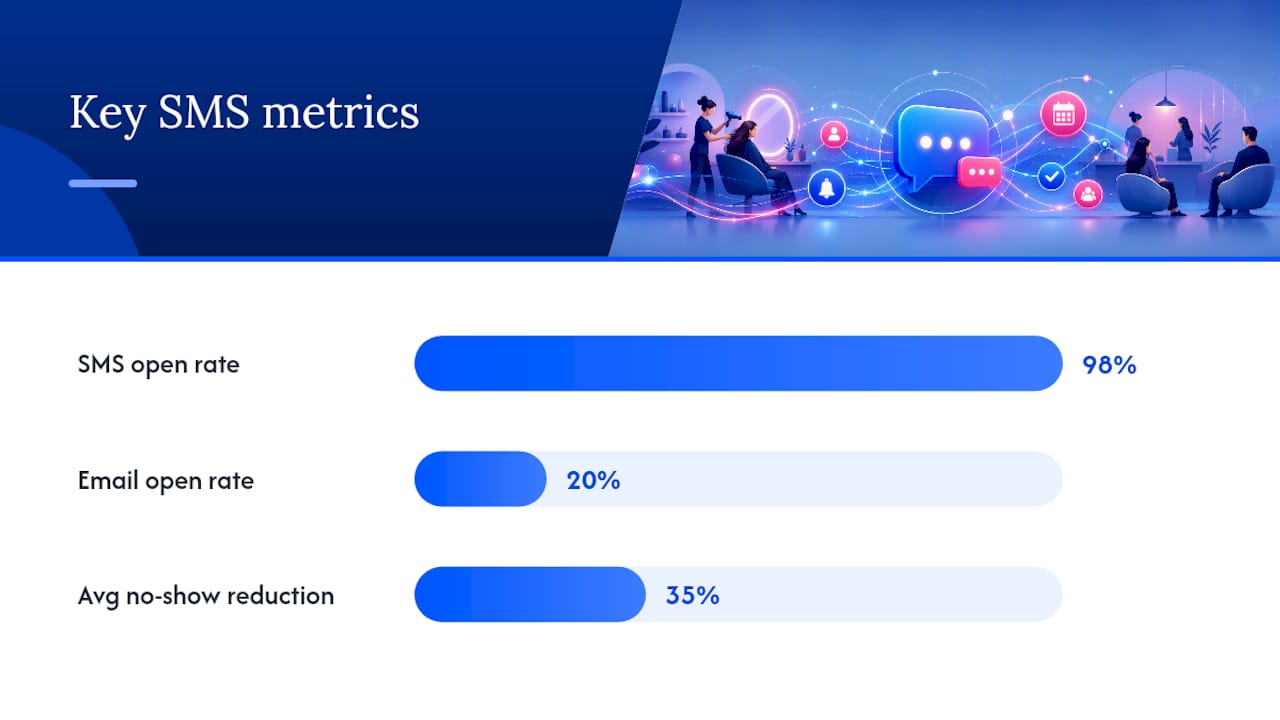
Average reported no-show reductions land around 35%, and SMS open rates near 98% compared to about 20% for email give you a sense of the ceiling. A delivery tracking dashboard is what lets you tell the difference between a genuinely disengaged client and a bad phone number sitting quietly in your records.
Run a simple 4-week pilot to see your own numbers:
| Week | Action | What to Measure |
|---|---|---|
| 1 | Baseline (no reminders active) | Current no-show rate |
| 2 | Activate 24-hour + 2 to 4 hour SMS sequence | Delivery rate, confirm rate |
| 3 | Continue, flag unconfirmed high-value bookings | No-show rate trend |
| 4 | Compare to baseline | Recovered revenue from filled slots |
Improvements often show up within the first few weeks, though how much depends on where your no-show rate started and how consistently the cadence runs.
Pricing Models and the Feature Checklist That Actually Matters
Before signing up for any reminder tool, run it against a short list of non-negotiables: two-way SMS, delivery tracking, real calendar sync, editable templates, configurable cadence per service, one-tap reschedule links, and reporting you can actually read without exporting to a spreadsheet.
Pricing splits into two models, and the difference matters more than the sticker price:
- SMS included in the base plan. Predictable monthly cost, no surprise overage at the end of a busy month.
- Per-message or bolt-on SMS fees. Can look cheaper upfront but scales unpredictably once your client list grows, especially for multi-location salons sending hundreds of reminders a week.
Red flags worth walking away from:
- No delivery tracking, meaning you have zero visibility into whether a message actually reached anyone.
- SMS locked behind an expensive add-on tier rather than built into the core plan.
- One-way messaging only, with no way for clients to confirm or reschedule by reply.
Before you commit, ask any vendor directly about carrier coverage in your region, whether you get a dedicated sender ID or a shared one (shared numbers get flagged as spam more often), and what support looks like when a delivery issue crops up mid-week.
Step-by-Step Setup Checklist for Rolling Out SMS Reminders
- Audit every client record for correct phone numbers and confirm time zones match each physical location.
- Connect your calendar or booking system and test with a handful of sample appointments to confirm the sync is real-time, not delayed.
- Build your 24-hour and 2 to 4 hour templates, set the cadence per service type, and turn on two-way replies with mapped codes (C, R, X).
- Run an end-to-end test with staff using their own numbers, then roll out to a small client subset before going live salon-wide.
- Monitor delivery reports daily for the first week to catch bad numbers or carrier issues before they snowball into missed reminders.
Treat that last step as non-negotiable. A single misconfigured template or an unmapped reply code discovered on week three, instead of day one, means weeks of clients who never got the message they needed.
How Exclusively Supports Salon SMS Reminders
Reminder systems only work as well as the booking data feeding them, and that’s where a fragmented setup usually breaks down. Exclusively’s branded mobile apps and booking flow keep client phone numbers, service details, and appointment times in one consistent record, which is exactly what a reliable reminder sequence depends on.
- Branded booking and apps reduce the manual re-entry that causes bad phone numbers and mistimed reminders.
- Integrated Square payments mean no-show policies tied to a card on file connect directly to the same booking record your reminders pull from.
- Booking help videos walk through setup step by step if you’re configuring this for the first time.
The gap between a reminder system that works and one that quietly fails usually isn’t the messaging software. It’s the booking data underneath it.
Segmenting Clients for Reminders That Actually Land
A single generic template works fine for a walk-in trim. It works poorly for a color client who books six weeks out and needs a very different nudge than someone who booked yesterday for a same-day blowout.
Segment your client base by a few practical categories: booking lead time, service value, and visit history. Clients who book far in advance benefit from an extra reminder a week out, on top of the standard 24-hour message, since long lead times are where appointments get forgotten. High-ticket services, like extensions or multi-step color, justify a personal touch, a slightly warmer tone, maybe a note about what to bring or expect.
New clients need more context than regulars. A first-timer benefits from parking or arrival instructions folded into the reminder. A five-year regular just needs the time and a confirm button.
You can also segment by response behavior. Clients who consistently confirm within an hour of the first reminder rarely need the second message, and skipping it reduces message volume without hurting reliability. Clients who routinely ignore the 24-hour reminder but respond to the 2-hour one are telling you something about how they use their phone. Adjust their personal cadence rather than forcing everyone through the identical two-message sequence.
This kind of segmentation takes more setup than blasting one template to your entire list, but it’s the difference between reminders that feel like noise and reminders that feel like your salon actually knows the client.
Protecting Client Privacy and Data in Your SMS System
Client phone numbers, appointment history, and service preferences are personal data, and a reminder system that mishandles them creates real liability, not just an inconvenience.
Start with access control. Not every staff member needs to see the full client contact list; front desk and management roles typically need it, floating stylists usually don’t. Limit who can export or download the client database, since a spreadsheet emailed to a personal account is how most small-business data leaks actually happen.
Choose a reminder platform that encrypts data in transit and at rest, and that doesn’t store full message logs indefinitely without a clear retention policy. Ask any vendor how long they keep message content and client phone numbers after a client is deleted from your system, and whether that data is shared with third parties for any purpose beyond delivering your messages.
Payment-linked reminders add another layer. If a no-show policy ties to a card on file, make sure that payment data runs through a PCI-compliant processor rather than being stored alongside your message history. Keeping payment data and messaging data in separate, properly secured systems limits your exposure if either one is ever compromised.
Finally, train staff on what never to text a client: full card numbers, medical details tied to services, or anything a client wouldn’t want visible on a shared or unlocked phone. SMS is convenient precisely because it’s low-friction, which is also why it’s the wrong channel for anything sensitive beyond the appointment itself.
Consent, Opt-Outs, and Staying Compliant With SMS Reminders
Sending automated texts without consent isn’t just bad practice, it can violate consumer protection rules in most markets. Before a client receives a single reminder, you need documented consent that they agreed to receive SMS messages, typically captured at booking or intake.
In the United States, the CTIA’s messaging guidelines require a clear opt-in and an easy opt-out on every automated message. Any client texting “STOP,” “UNSUBSCRIBE,” or a similar keyword must be removed from future automated messages immediately, and your system should confirm the opt-out with a final message rather than going silent.
For salons operating in the European Union or serving EU residents, GDPR adds requirements around what data you collect, how long you retain it, and a client’s right to request deletion of their information entirely. That means your booking system needs a real process for removing a client’s phone number and message history on request, not just archiving it.
Practical compliance steps that hold up regardless of region:
- Capture consent explicitly at the point of booking, not buried in a terms-of-service page nobody reads.
- Include an opt-out instruction in your first message to any new client, not just in a rarely-read policy.
- Log consent and opt-out timestamps so you have a record if a client disputes ever having agreed to receive texts.
- Review your message retention settings against whatever regulation applies to your client base, since a global client list may span multiple jurisdictions.
None of this is complicated to build once, but it needs to be built before your first automated message goes out, not retrofitted after a client complains.
A Brief Note on Piloting This the Right Way
Don’t overhaul your entire reminder system overnight. Run the 24-hour plus 2 to 4 hour sequence for two weeks, watch delivery and confirm rates daily, then adjust. Prioritize two-way confirmations first, as that’s where staff save the most time and where you’ll see the clearest signal that it’s working.
— Service
Get Your Salon’s SMS Reminders Running Without the Patchwork
Most salons piece together a reminder system from whatever their booking software happens to include, then bolt on a separate SMS tool when that falls short, and end up managing two logins and two sets of client data. Exclusively skips that entirely: your branded booking system, mobile apps, and Square payment integration run on one platform, so reminder data, confirmations, and no-show policies all pull from the same client record instead of syncing (or failing to sync) between separate tools.

That single source of truth is exactly what makes the two-way SMS workflows in this article reliable instead of theoretical. Check the appointment and booking features to see how reminders, cadence, and calendar sync work inside Exclusively, or compare plans on the pricing page to see what’s included versus billed separately. If you’re currently on another platform, the comparison against Booksy breaks down where reminder handling differs. Book a demo and test the reminder sequence against your own calendar before you commit to anything.