
Fill Cancellations in Two Weeks: Waitlist Sync for Salon Owners
Fill Cancellations in Two Weeks: Waitlist Sync for Salon Owners

A digital waitlist that syncs with your salon calendar and sends automated SMS alerts is the fastest way to reduce lobby congestion and fill canceled slots; explore specialized salon SEO services to boost your salon’s visibility and bookings. The right setup connects your booking system, gives each stylist their own queue, and handles notifications automatically. Test it for two weeks focused on SMS timing and fill rate before rolling it out salonwide.
TL;DR:
- Waitlist systems should support real-time calendar integration, per-stylist queues, and automated SMS alerts to minimize manual management and enhance efficiency.
- The system must include rules for VIP prioritization, overbooking limits based on no-show history, and timeout policies to prevent queue clogging during busy periods.
- Proper synchronization with POS, payments, and CRM data reduces double bookings and streamlines slot reallocation when cancellations occur.
- Testing SMS delivery, time zone accuracy, and team training on standardized procedures are essential before full implementation.
- Investing in branded platforms with integrated payments and reporting provides better long-term value than free tools for growing or multi-location salons.
Table of Contents
- What Should a Salon Waitlist Management System Actually Do?
- How Do You Sync a Waitlist With Scheduling, POS, and Payments?
- How Do You Run Waitlist Queues Day to Day?
- What Metrics Prove a Salon Waitlist Is Working?
- How Do You Choose and Implement a Salon Waitlist System?
- Why a Branded, Integrated Platform Often Wins Long Term
- Free Waitlist Tools vs. Full Branded Platforms
- See How Exclusively Handles Waitlist and Booking Together
- Sources
What Should a Salon Waitlist Management System Actually Do?
Most salons don’t need more software. They need software that talks to the software they already have. The features below separate a real operational tool from a glorified sign-up sheet.
Queue modes that match how your salon actually books. A system needs three modes working together: per-stylist lines for salons where clients follow a specific person, next-available for high-volume shops that just need a chair filled, and a blended stream that treats walk-ins and booked appointments as one line rather than two separate systems fighting for the same chair.
Self check-in that fits your lobby. QR codes at the front desk, a kiosk tablet, or a private link texted to a client all solve the same problem: getting someone into the queue without a receptionist typing their name in during a rush.
Messaging that doesn’t require a human to send it. Confirmations, ETA updates, and two-way texts for rescheduling all need to fire automatically, or the system just becomes another task for your front desk.
Rules that protect your schedule. Look for:
- Timeout rules that drop a client from the queue if they don’t respond within a set window
- VIP priority tiers for members or high-spend regulars
- Overbooking limits based on a stylist’s actual no-show history, not a flat guess
Vendor documentation from platforms like Tilavon shows these overbooking and priority-tier rules already built into mainstream salon queue tools, which tells you this is standard functionality, not a premium add-on. Round it out with a live queue display on a lobby TV and real-time sync so every stylist’s tablet shows the same queue at the same second.
How Do You Sync a Waitlist With Scheduling, POS, and Payments?
A waitlist that lives apart from your booking calendar creates the exact problem it’s supposed to solve: double-booked chairs and stylists working from two different versions of the day. Waitwhile’s documentation on salon and hairdresser scheduling describes this as a single stream where booked appointments and walk-ins land on one calendar instead of two competing lists. That’s the baseline, not a bonus feature.
Beyond the calendar, look for integrations with:
- Your point-of-sale system, so a filled slot turns into a logged sale automatically
- Payment processors like Square or Stripe for deposits and no-show fees
- Client CRM data, so the front desk sees history and preferences at check-in
- A booking widget on your own website, not just a third-party app
A workable automation rule: when a client cancels, auto-offer the slot to the next person in the waitlist queue for 15 minutes; if they don’t confirm, release it to the next name and text the original client that the slot is gone.
Pro Tip: Test SMS deliverability and time zone settings before your launch week, not during it. User reviews of platforms like Waitwhile consistently flag delayed texts and multi-stylist sync lag as the most common early complaints, and both are catchable in a one-day dry run.
How Do You Run Waitlist Queues Day to Day?
Software only works if your team actually uses it the same way every shift. That means picking a queue model and writing down the rules before you go live, not figuring it out on a busy Saturday.
Run per-stylist queues when clients book by name and loyalty matters more than speed. Run next-available when your shop is volume-driven and clients care more about getting seen than who sees them.
- Assign a call-forward owner. One staff member (usually the front desk) sends the “you’re up” text, not whoever is nearest a screen.
- Set a no-show window. Give a notified client 10 minutes to walk in before marking them as missed and moving to the next name.
- Build in a buffer slot. Block 10 to 15 minutes per stylist per shift so a walk-in fill doesn’t push every booked appointment back.
- Use float staff for overflow. If one stylist’s queue backs up, a float can absorb overflow without canceling booked appointments elsewhere.
- Train on day one, not week three. Walk every receptionist and stylist through a live mock queue before the system touches a real client.
What Metrics Prove a Salon Waitlist Is Working?
Five numbers tell you whether the system is paying for itself: waitlist fill rate (the percentage of open or canceled slots successfully rebooked), average wait time, no-show rate, chair utilization, and revenue recovered from slots that would otherwise have sat empty.
Notification timing changes how a wait actually feels to the person sitting in it. Research on queue psychology from Cornell’s School of Hotel Administration shows that how a wait is communicated shapes perceived wait time as much as the actual clock does, which is exactly why testing 10, 20, and 30 minute notification windows against your fill rate matters more than guessing at “what feels right.”
Review fill rate and no-show data weekly. Save staffing and pricing decisions for a monthly look, once you have enough data to separate a bad week from a real trend.
How Do You Choose and Implement a Salon Waitlist System?
Pick the wrong tool and you’ll spend more time managing the software than the queue. Work through this before signing anything:
- Confirm calendar integration first. If it doesn’t sync with your existing booking system in real time, cross it off the list.
- Check per-stylist queue support. Not every platform separates queues by provider, and that matters if your clients book by name.
- Ask about SMS volume and cost. Some platforms cap texts on lower tiers or bill per message, which adds up fast in a walk-in-heavy shop; buyer guide comparisons for tools like GlossGenius are worth checking for exactly this.
- Confirm kiosk or QR support if your lobby needs self check-in without staff intervention.
- Review reporting depth. Fill rate and no-show tracking should be built in, not a manual spreadsheet you maintain on the side.
- Read the contract terms for cancellation policy and monthly minimums before committing.
Run a two-week pilot on one shift before going salonwide. Define success as a specific fill-rate increase and a measurable drop in average wait, then test SMS timing against those numbers.
Pro Tip: Write your client-facing announcement before launch day, not after. A short text or Instagram post explaining “text STYLIST to join the list” prevents a confused front desk from fielding the same question twenty times in one shift.
Have a fallback plan for sync errors, SMS failures, and the double-booking that happens when a walk-in and an online booking land in the same slot at once. Someone on staff needs to know how to manually override the queue when the software hiccups.
Why a Branded, Integrated Platform Often Wins Long Term
A branded website and native app keep the client experience consistent from the first Google search to the follow-up booking, which matters more for repeat business than most owners expect. Letting each stylist control their own pricing and availability cuts down on the internal scheduling conflicts that quietly drive no-shows. Pair that with integrated payments through Square and membership tools, and a filled waitlist slot turns into logged revenue instantly instead of a manual follow-up. Onboarding videos and transparent payment terms make the switch easier for staff who’ve never used a queue tool before.
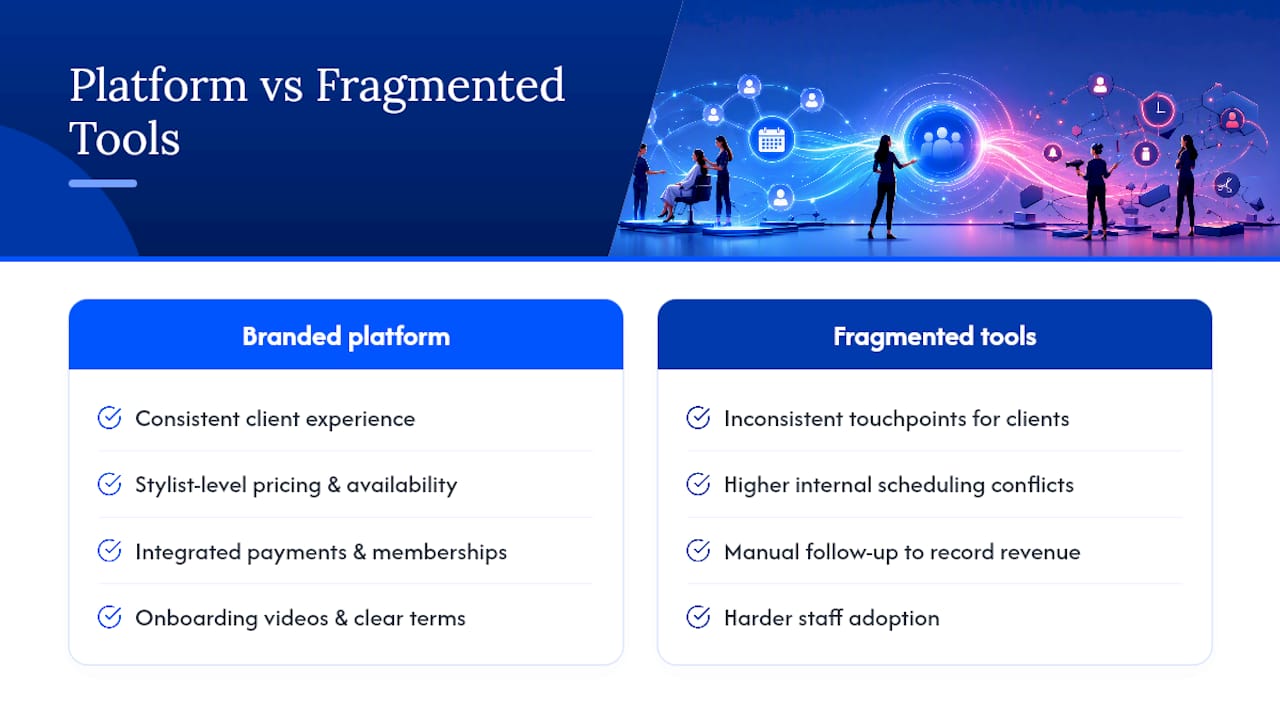
Free Waitlist Tools vs. Full Branded Platforms
Free tools handle basic walk-in chaos fine. A phone-based or QR check-in line, the kind described in Waitlistapp’s salon walk-in guide, works for a single-chair shop that just needs order in the lobby.
Branded platforms cost more, but they buy provider-level pricing control, integrated payments, and reporting that actually holds up over a full year of data. My rule: upgrade the moment you need memberships, multi-location branding, or consistent revenue tracking on recovered slots, not just a tidier line.
— Service
See How Exclusively Handles Waitlist and Booking Together
Some platforms offer salons a fully branded website and app where each stylist can control pricing and availability, and where waitlist fills, appointments, and payments run through one connected system instead of three disconnected tools.

That means a canceled slot doesn’t just disappear from a calendar. It gets offered, filled, and paid for through the same branded experience your regulars already recognize, backed by integrated Square payment processing and step-by-step onboarding videos for your front desk. If you’re weighing platforms, the pricing page breaks down what’s included at each tier so you can compare the real cost against what a filled chair is worth to your shop. Check it out and see which plan fits your booking volume before your next slow Tuesday turns into another empty chair.
Sources
- Scholarship
- Salon Waitlist & Walk-In Queue Management | Tilavon
- Salon & hairdresser appointment scheduling and waitlist app | Waitwhile
- Salon & Barbershop Waitlist App — Keep Every Chair Full