
Stop Double Bookings: 7 Steps to Fix Stylist Scheduling for Salons
Stop Double Bookings: 7 Steps to Fix Stylist Scheduling for Salons
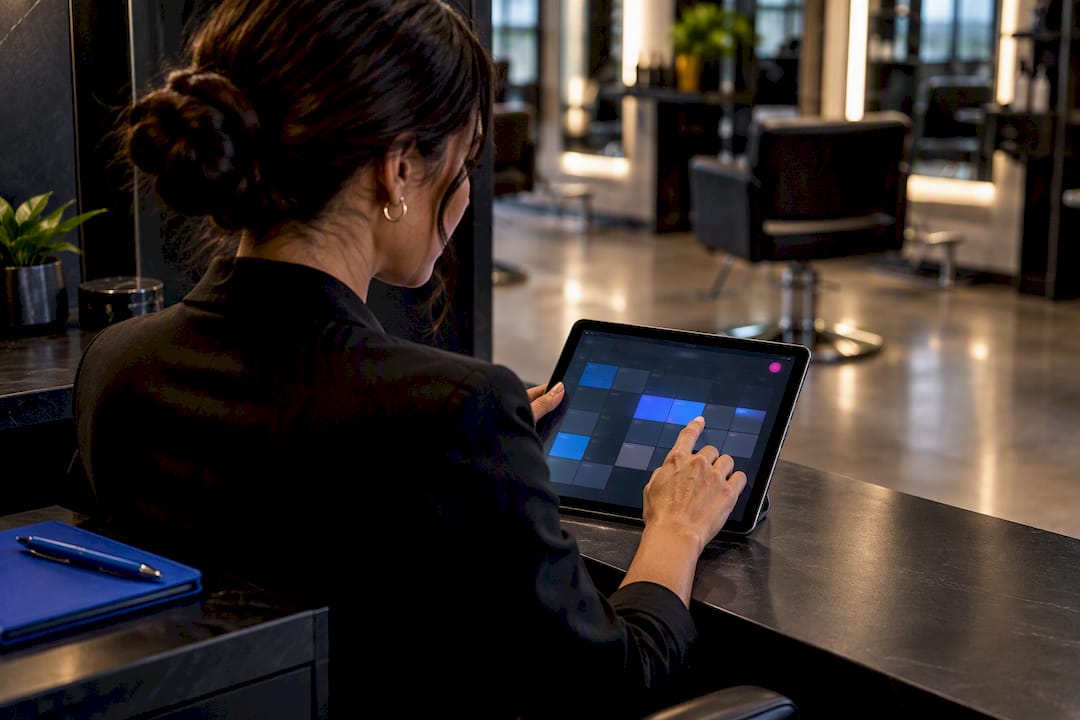
The fastest way to stop double-books and shrink no-shows is a salon-specific booking platform configured with per-stylist availability, skill-based routing, service durations with buffers, two-way calendar sync, and automated reminders. Get those five pieces right and most scheduling chaos disappears on its own. The payoff shows up as fewer front-desk fire drills, fewer no-shows, and less time spent untangling conflicts by hand.
TL;DR:
- Salons should use booking platforms with per-stylist pages, skill-based routing, buffers, and two-way calendar sync to minimize errors and no-shows.
- Automating deposits, reminders, and waitlists significantly reduces last-minute cancellations and empty slots, especially for high-value services over 90 minutes.
- Regular updates, test bookings, and demand forecasting improve schedule accuracy, preventing under- or over-staffing that affects revenue.
- Clear policies for cancellations and rescheduling, including automated rebooking options, help retain clients and protect revenue.
- Branded, provider-level scheduling through platforms like Exclusively enhances control, client communication, and reduces mismatches compared to generic tools.
Table of Contents
- Setting Up Stylist Availability Scheduling: Which Features Actually Matter
- Step-By-Step Setup Checklist for Stylist Schedules and Booking Rules
- Keeping Stylist Schedules Accurate as Things Change
- Handling Walk-Ins, Waitlists, and Multi-Stylist Services
- Integrations That Actually Reduce Scheduling Friction
- Exclusively’s Approach to Branded, Provider-Level Scheduling
- Building a Clear Cancellation and Rescheduling Policy
- Setting Custom Rules for Recurring Appointments and Special Days
- How to Tell Clients About Schedule Changes Without Losing Them
- Editorial Perspective: The Real Trade-Off in Automating Schedules
- Getting Started With Exclusively
- Sources
- FAQ
Setting Up Stylist Availability Scheduling: Which Features Actually Matter
Not every booking tool solves the same problem, and salons have a specific one: multiple providers, multiple skill sets, and a fixed number of chairs. The features below are the ones that actually prevent errors rather than just look good on a features page.
- Per-stylist booking pages. Each stylist gets a dedicated page listing their services, pricing, and photos, so clients self-select the right provider instead of calling the front desk to ask “who does balayage?”
- Skill-based routing. Tagging stylists by specialty and routing bookings accordingly prevents clients from landing on a provider who isn’t qualified for the service they want, which is one of the more common and avoidable scheduling errors in multi-chair salons.
- Service durations and buffers. A 45-minute color service needs a 45-minute block, plus a buffer for cleanup or processing time, or the next client waits.
- Daily service limits. Capping how many color services or extensions a stylist takes per day protects quality and prevents burnout scheduling.
- Chair and station mapping. Bookings should reflect how many chairs you actually have, not just how many stylists are on payroll, since a fully staffed day with only three open stations still caps out at three simultaneous appointments.
- Two-way calendar sync. When a stylist blocks personal time on Google Calendar, the booking page should reflect it instantly.
- Automated confirmations, reminders, deposits, and waitlists. These four features do more to cut no-shows than any policy printed on a receipt.
Pro Tip: Require deposits specifically on services over 90 minutes or over a set dollar threshold. Short cuts rarely need one, but a canceled 3-hour color correction costs real chair time you can’t recover same-day.
Step-By-Step Setup Checklist for Stylist Schedules and Booking Rules
Getting the schedule right the first time saves weeks of cleanup later. Work through this in order.
- Build per-stylist profiles. Include services offered, exact durations, portfolio photos, and a unique booking link for each provider.
- Map services to skills. Tag each service with the skill or certification it requires, then enable skill-based routing so clients only see qualified stylists for specialized work like extensions or corrective color.
- Assign chairs and set capacity limits. Match every stylist to a station and cap daily or weekly bookings so the schedule never promises more chairs than the salon has.
- Turn on two-way calendar sync. Connect Google or Outlook calendars so personal appointments and time off block the booking page automatically.
- Require deposits on high-value services. Set this before launch, not after the first no-show on a $200 appointment.
- Publish weekly availability templates. Build a repeatable base schedule, then layer in time-off requests and swap approvals on top of it.
- Run test bookings. Book a multi-stylist service (a cut plus a color that needs an assistant) yourself to confirm the system blocks the right people at the right times before a real client hits the same snag.
Skipping step 7 is the most common mistake salons make. Complex services expose gaps that simple haircut bookings never will.
Keeping Stylist Schedules Accurate as Things Change
A schedule is only as good as its last update. Availability management for stylists breaks down not at setup but in the weeks after, when real life starts colliding with the calendar.
- Publish on a fixed cadence. Release next week’s schedule on the same day every week (Thursday afternoon works for a lot of salons) using a saved template as the starting point, so managers aren’t rebuilding from scratch.
- Require in-app availability updates. Texts get lost and forgotten. When stylists update their own availability directly in the booking platform, the schedule managers see is always the current one, not last week’s version with a mental asterisk.
- Route swap approvals through the system. Auto-approve like-for-like swaps (same skill level, same shift length) and require manager sign-off on anything else.
- Forecast demand from history. Look at your busiest hours over the past few months and staff accordingly. Matching staff mix to predicted demand by service type cuts both overstaffing on slow Tuesdays and understaffing on Saturday mornings.
- Separate booth-renter rules from employee rules. Booth renters typically control their own hours; employees follow salon-set shifts. Blurring that line inside one shared calendar is how cross-booking conflicts happen.
Mismatches between predicted demand and actual staffing are a quiet but persistent source of lost revenue in salons that never bother to look at their own booking history.
Handling Walk-Ins, Waitlists, and Multi-Stylist Services
Walk-in revenue and appointment-based revenue don’t have to compete if the queue logic is set up right.
- Route walk-ins to the shortest wait. A queue that automatically sends walk-ins to whichever qualified stylist is free next, rather than a fixed rotation, keeps wait times down and keeps every chair earning.
- Turn on automatic waitlist offers. When a client cancels, the system should text the next person on the waitlist an open slot instead of leaving it empty until someone calls.
- Block assistant time automatically. A balayage that needs a second stylist for foiling should reserve both people’s calendars at once, not just the lead stylist’s.
- Set clear priority rules for peak hours. Decide in advance whether an existing client’s appointment or a walk-in gets the next open chair on a busy Saturday, and apply that rule consistently.
Integrations That Actually Reduce Scheduling Friction
Not every integration matters equally. A few do most of the work.
Two-way sync with Google or Outlook calendars keeps external commitments visible on the public booking page in real time. Payment integrations through Stripe or Square let you collect deposits automatically, which is one of the more effective ways to cut no-shows on higher-priced appointments. Mobile apps or per-stylist mobile booking links matter because stylists rarely update availability from a desktop between clients. And embedding the booking page directly on your salon website, with a link from your Instagram bio, removes an entire step between someone deciding to book and actually doing it. Some lightweight booking widgets embed directly into existing websites for salons that want a fast, low-friction setup.
Salon-specific systems that combine real-time availability with service durations, buffers, and deposit collection tend to outperform generic scheduling tools built for other industries, simply because the underlying logic already matches how a salon actually operates.
Exclusively’s Approach to Branded, Provider-Level Scheduling
Exclusively gives each stylist control over their own pricing, availability, and profile page, all inside a platform that carries the salon’s own brand rather than a generic marketplace look. That provider-level control is what prevents the booking mismatches that generic tools tend to create, since every stylist’s page reflects exactly what they offer and when.
- Provider-level control: individual pricing, availability, and profile pages per stylist.
- Payment integrations: built-in Square and Stripe support for deposits and no-show protection.
- Guided onboarding: step-by-step booking help videos that walk managers through setup.
- Branded experience: a custom website and mobile app under the salon’s own name, not a third-party directory listing.
Building a Clear Cancellation and Rescheduling Policy
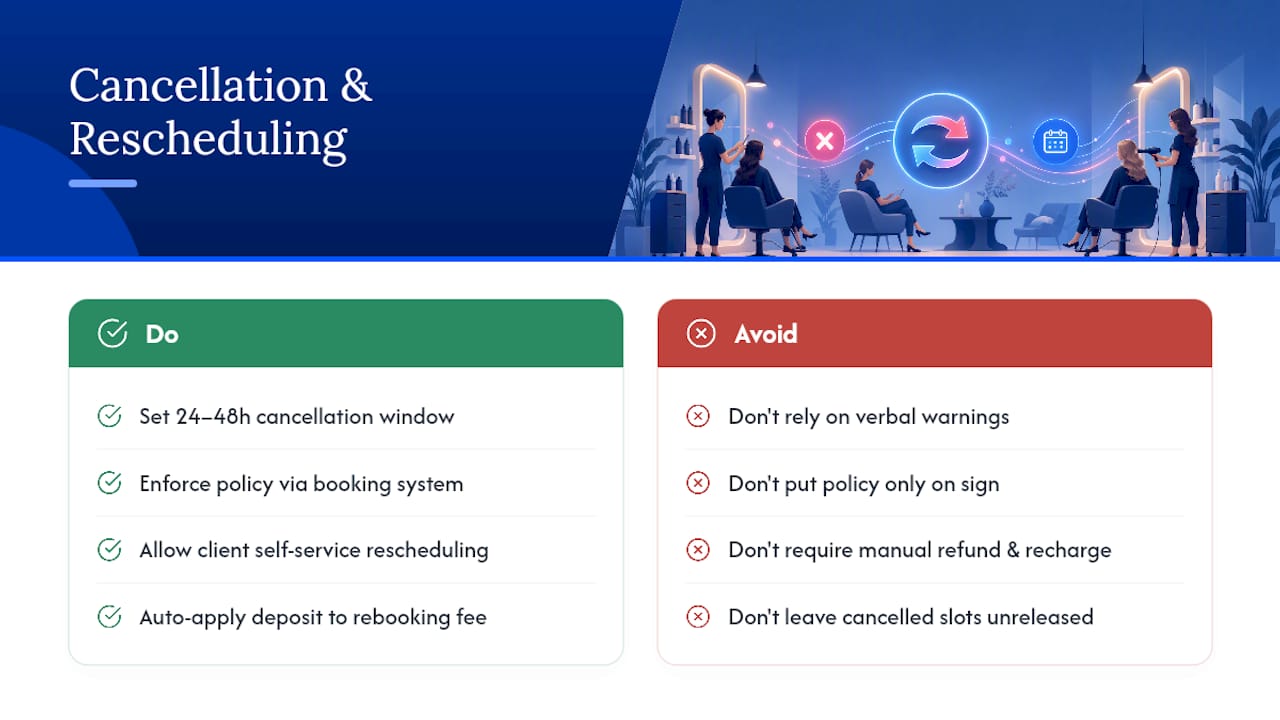
A vague cancellation policy trains clients to cancel casually. A clear one, enforced consistently through the booking system rather than a verbal warning at checkout, does the opposite.
Set a specific cancellation window, commonly 24 to 48 hours before the appointment, and state what happens if a client misses it: forfeited deposit, a rebooking fee, or both. The policy needs to live inside the booking confirmation and reminder texts, not just on a sign at the front desk that nobody reads until it’s too late.
Rescheduling should be self-service wherever possible. Letting clients move their own appointment to another open slot, within the policy window, cuts down on phone calls and gives the front desk one less task during busy hours. For late cancellations or no-shows on deposit-protected services, the deposit should automatically apply toward the rebooking fee rather than requiring a manual refund-and-recharge process.
Stylists need visibility into this too. When a client cancels, the freed slot should immediately become available for waitlist offers or walk-ins, not sit empty because nobody manually released it. The tighter that loop runs, automatically, the less revenue leaks out of last-minute changes.
Setting Custom Rules for Recurring Appointments and Special Days
Regular clients who book the same service every four to six weeks deserve a smoother path than starting from scratch each time. Recurring appointment rules let a client lock in a standing slot, say, every third Thursday at 2pm, while still giving the salon the ability to override it for holidays or stylist time off.
Special days need their own layer of rules. Holidays, half-day closures, and stylist vacation stretches should block booking automatically rather than relying on someone remembering to close the calendar manually. The same goes for shortened hours around major holidays; if the salon closes at 3pm on Christmas Eve, that needs to be set weeks in advance, not the day before.
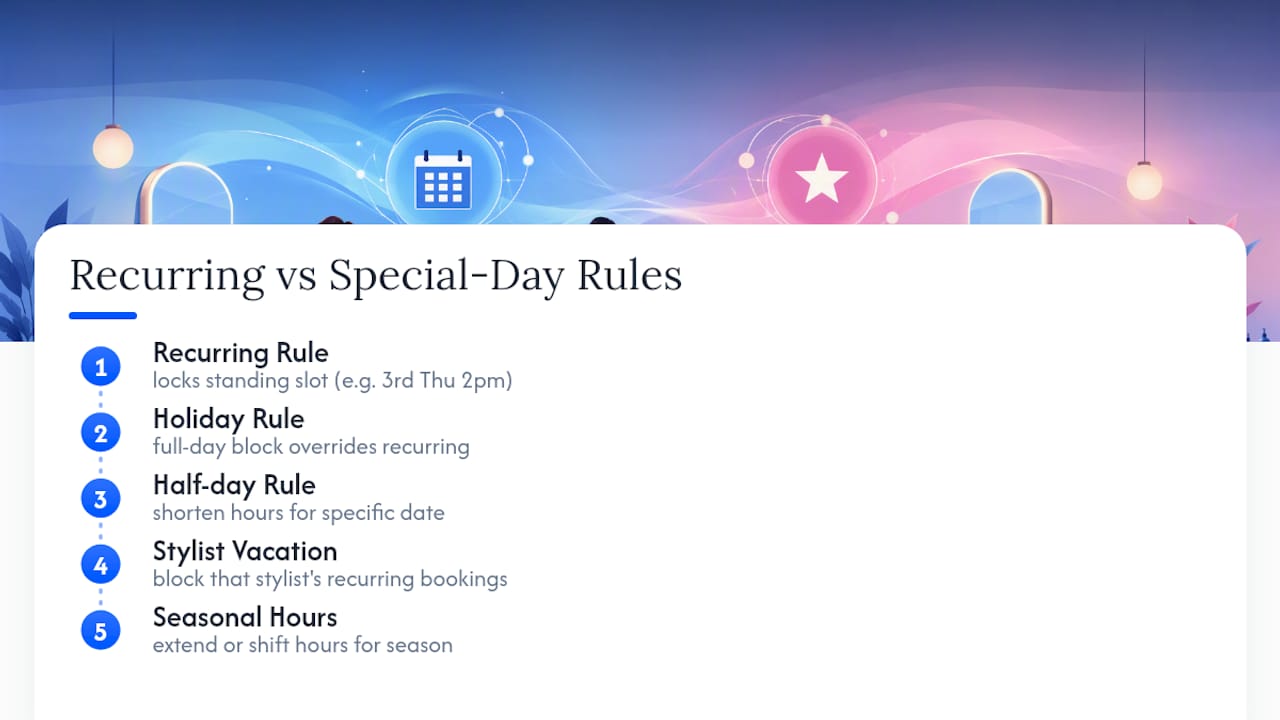
Some salons also build seasonal rules, extending hours in December for holiday party season, or opening earlier on Saturdays during wedding season. Whatever the pattern, the goal is the same: the exceptions live inside the scheduling system as rules, not as tribal knowledge that only the manager on duty remembers to apply.
How to Tell Clients About Schedule Changes Without Losing Them
Clients tolerate schedule changes far better when they hear about them early and directly, rather than finding out when they show up to a locked door.
For planned changes, like a stylist reducing their days or a salon shifting weekend hours, give clients at least two to three weeks of notice through text, email, and an update on the booking page itself. For last-minute changes, like a stylist calling in sick, a text with a same-day apology and two rebooking options works better than a vague “we’ll be in touch.”
Always lead with the alternative, not the apology. “Your 2pm with Jamie needs to move. Here are three open times this week with Jamie or Alex” gets a faster, calmer response than an open-ended cancellation notice that puts the burden back on the client to figure out next steps.
Editorial Perspective: The Real Trade-Off in Automating Schedules
Automating stylist availability scheduling means giving up some staff autonomy, especially with booth renters who are used to full control over their own calendars. The right balance lets automation recommend schedules while managers keep final approval. Expect a short onboarding stretch in exchange for admin time saved every week after.
— Service
Getting Started With Exclusively
Exclusively is built for barbers and beauty professionals who want their booking system to look and feel like their own brand, not a rented listing on someone else’s platform. Every stylist sets their own pricing, availability, and service menu, while the salon keeps one consistent brand across the website, the app, and every booking page.

The Website + Booking plan runs $199 per month and covers the branded website plus the full booking system with per-stylist availability and skill-based routing built in. Salons that also want native iOS and Android apps under their own name can step up to Website + Booking + Apps at $299 per month. If you’re a barber or stylist testing whether a custom-branded booking setup fits how your salon actually runs day to day, walk through the customizable appointment features or book a call to see it configured for your specific chairs, staff, and services.
Sources
Salon-specific booking logic, from team scheduling and chair mapping to availability updates via mobile, shaped the practices covered above. For marketing your new booking links once they’re live, salon SEO services can help more clients find them.
- Decagon
- Salon scheduling — ZoomShift
- Team Scheduling for Salons, SchedulingKit
- Staff scheduling optimization | Prefero
FAQ
What is the best scheduling app for hairstylists?
There’s no single best app for every salon, but the strongest options share per-stylist availability controls, skill-based routing, calendar sync, and automated reminders. Salon-specific platforms like Exclusively that add branded booking pages and provider-level pricing control tend to fit multi-stylist salons better than generic scheduling tools.
How much do you tip a $100 hair stylist?
A standard tip on a $100 service runs 15% to 20%, so $15 to $20 for good service. Some clients tip higher for exceptional results or a stylist who worked well past the scheduled time.
What to tip on a $70 haircut?
Using the same 15% to 20% range, a $70 haircut typically gets a $10.50 to $14 tip. Round up if the stylist squeezed you in on short notice or handled a more complex cut than booked.
What is the best POS system for a hair salon?
The best point-of-sale system for a salon is one that connects directly to the booking calendar, so payments, deposits, and no-show fees tie back to the same schedule. Integrated payment options through Square or Stripe, paired with a booking platform, cut down on the double entry that happens when scheduling and payments live in separate systems.
How do I stop stylists from double-booking clients?
Two-way calendar sync combined with automatic buffer times between services is the most reliable fix, since it blocks a slot the moment it’s booked anywhere, including on a stylist’s personal calendar. Chair and station mapping adds a second layer of protection by capping bookings at the number of physical stations available.